Family routine planner app: what to look for in a family hub
What if the family routine planner app you choose brings the school run, meals and household jobs into one place, but still isn’t something to rely on in an emergency? When plans are scattered across calendars, chats and notes, it can be hard to see what’s happening. And not every detail needs to be visible to every family member.
That’s why it helps to look beyond a tidy calendar. A useful family hub should support the way your household manages recurring routines, shared tasks and practical information. It should also make clear who can access what, so you can decide what belongs in a shared space.
This guide compares the features to consider, from shared calendars and lists to member access and household records. It also draws a clear line between information a planner can organise and emergency support it can’t provide. You’ll be better placed to choose a straightforward way to coordinate everyday family life, without expecting an organiser to do a job it wasn’t built for.
Key Takeaways
- Identify which recurring plans and household tasks would benefit most from being brought together.
- Compare a family routine planner app by checking shared calendar access, recurring events, lists and daily overviews.
- Check how household information is organised, and don’t mistake a planner for emergency support.
- Start with a few useful routines, invite the people who need access and review what works before adding more.
- Look for clear permissions so you can decide which household information different members can access.
What should a family routine planner app help your household organise?
The school run is in one calendar, work commitments in another, and the shopping list lives in a chat or on a scrap of paper. Add appointments and household jobs, and it can take effort just to work out what the week looks like. A family routine planner app gives household members a shared place to check recurring plans and everyday tasks.
Start with the coordination problems that cause the most confusion, not the app with the longest feature list. Perhaps everyone needs to know who’s collecting from school, when a regular appointment falls or what needs adding to the weekly shop. The right features depend on your household’s routines.
Which parts of family life can a routine planner organise?
Look for shared schedules and recurring plans, alongside practical tools such as shopping lists and household to-dos. A central overview can help family members see upcoming commitments without piecing together information from several places. If meals are part of the weekly routine you want to coordinate, check whether the app offers a meal planning feature.
Think about who needs access and how they’ll use the information. A useful shared calendar should make commitments easy to check and recurring events straightforward to manage. An online calendar provides the basic structure: scheduled events can be viewed digitally, rather than relying on a paper diary that only one person can see.
Is a family planner the same as an emergency information app?
No. A routine planner is for coordinating everyday household life. It may also store reference information, but storing something doesn’t mean an app will send an urgent alert or arrange a response. A planner is not a substitute for emergency services or specialist care.
Check each app’s stated functions before relying on it for anything time-critical. Look at whether it offers alerts, what information it stores and who can access that information. Don’t assume a calendar entry or saved document will notify the right person in an emergency. Keep emergency arrangements separate from routine planning, and use services designed for urgent help when that’s what the situation calls for.
A planner is most useful when its role is clear: bring recurring commitments and everyday tasks together, then help your household see what needs attention. Choose around those needs first. More features only matter if they support the way your family actually plans.
How to compare family routine planner app features against your daily needs
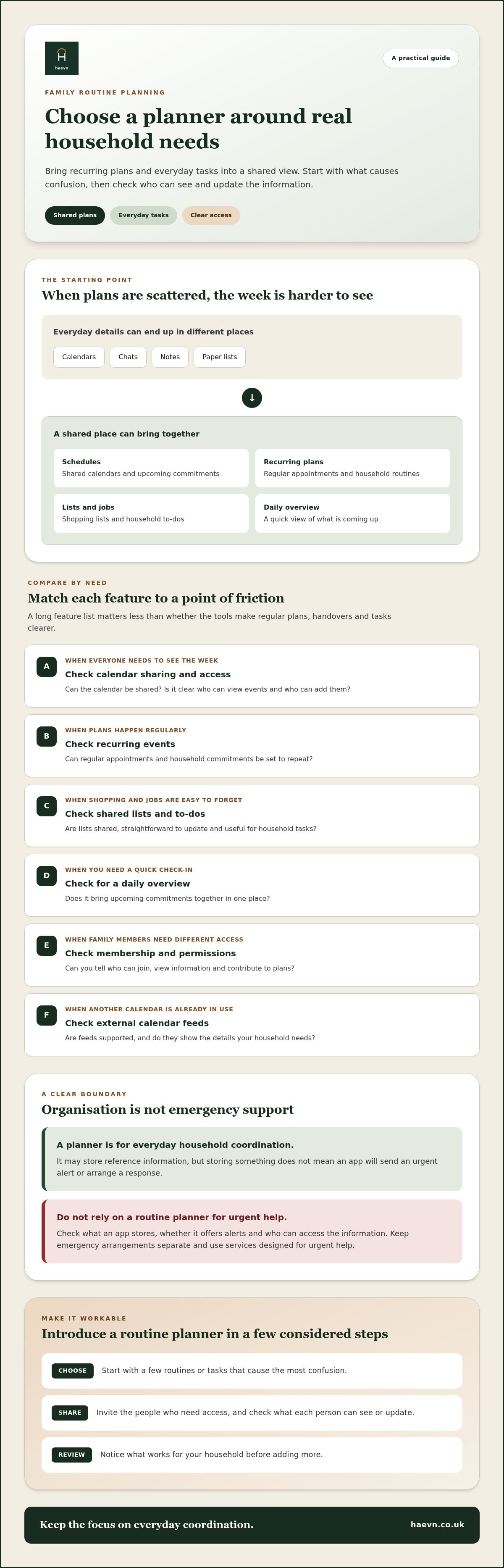
Compare each feature with a real point of friction in your household. A family routine planner app can have an impressive list of tools, but what matters is whether it makes regular handovers, appointments and tasks clearer. The American Psychological Association has reviewed research on family rituals and routines, finding links with positive family and health outcomes. That’s a useful reason to make routines workable, not complicated.
| Your household need | What to check |
|---|---|
| Everyone needs to see the week | Can the calendar be shared, and is it clear who can view or add events? |
| Plans repeat regularly | Can you set recurring events for regular appointments and household commitments? |
| Shopping and jobs get forgotten | Are shopping lists and household to-dos shared and easy to update? |
| You need a quick daily check-in | Is there a daily overview that brings upcoming commitments together? |
| Some family members need different access | Can you understand who can join, view information and contribute? |
| You already use another calendar | Check whether external calendar feeds are supported and whether they show the details you need. |
Which planning features matter for recurring family routines?
Test recurring events against the patterns you actually have, such as a weekly club, regular appointment or alternating household responsibility. Check that the shared view makes the next commitment easy to understand, including its date and who needs to know. If shared scheduling is your main need, review the shared family calendar feature. A smaller set of useful tools is often easier to adopt than a long checklist.
How should families assess shared access and permissions?
Ask who can join, see shared information and contribute to plans. If relatives or other household members need access, check the membership limit and whether permissions suit your arrangements. Compare how each app explains its privacy practices and what information is shared. Don’t assume every member needs the same access, or rely on broad security claims without clear details.
Try the comparison with one typical week: would each person know what’s happening and where to add a task? If you’d like to explore a shared calendar in practice, take a look at the planning tools.
Can a family routine planner app keep useful information easy to find?
Some household information is part of a routine. A calendar entry might show when a boiler service is booked, while a warranty or bill is reference information you may need to find later. A family routine planner app may bring some of these details together, but check whether it organises household information as well as schedules. A diary entry is not the same as a stored record, and neither is an emergency response service.
What household information might be useful to organise?
Think about the details you currently search for in email, paper folders or old messages. These might include utility bills, appliance warranties and manuals. If an app supports household information storage, check how you can label or group items and whether the people who need them can access them. A clear label, such as “washing machine manual” rather than “document 4”, makes information easier to retrieve.
For a practical example, review the household document and admin feature and compare its stated functions with the information you want to organise. Keep the distinction clear: household admin tools can help you manage practical details, but they aren’t a place for specialist records or emergency support.
What should an app not be expected to do?
Storing information is not the same as sending an alert, contacting emergency services or providing live tracking. An app may help household members find a saved detail or check a shared plan, but don’t assume it will notify someone when circumstances change. Verify the app’s actual capabilities and limits before relying on it, especially for time-critical needs.
A family organiser helps you find household information; emergency services respond to emergencies. Specialist records and urgent support have their own requirements, so a planner should not be treated as a substitute.
There’s also a balance in how a family uses digital tools. Ohio State University Extension explores how technology affects family interaction. A planner is most useful when it reduces the friction of coordinating practical details, rather than becoming another place everyone has to monitor. Agree what belongs there, who needs access and what still needs to be handled elsewhere.
How to choose and introduce a routine planner your family will use
A new planner only helps if it fits the way your household already works. Before setting it up, agree what needs organising, who needs access and what belongs elsewhere. Keep emergency arrangements and specialist services separate from everyday planning. Focus on features you can verify and needs your household actually has.
How to get started without adding more admin
- List the recurring snags. Note the plans and household tasks that regularly cause confusion, such as appointments, collection arrangements or who is responsible for a job.
- Compare the useful features. Check the shared calendar, recurring events, lists, daily overview and access settings against that list. Don’t choose on feature count alone.
- Pick a few routines to begin with. Add one shared calendar and a small set of regular commitments. There’s no need to transfer every note, task and past event at once.
- Invite the people who need access. Agree what information belongs in the shared space and who will add or update plans. Make sure everyone knows where to check for changes.
- Review and adjust. Ask whether the planner has reduced duplicate messages or uncertainty. Keep what helps, change what doesn’t, and add routines gradually.
A simple household agreement can make the difference between a shared tool and another place to check. For example, decide that the person who learns about a schedule change updates the calendar, and that everyone checks it before making arrangements. Keep reference information in its agreed location rather than scattering it through event notes.
Be clear about access, too. Not everyone needs to see every detail. Consider who should be able to view plans, add tasks or change shared information, and check that the app’s permissions suit your arrangements. A family routine planner app should support a practical division of coordination, not leave one person responsible for maintaining every detail.
Start small, then review the result together. If plans are easier to find and there’s less duplication, add another routine when it becomes useful. If the setup creates extra work, simplify it.
Ready to put a few shared plans in one place? Start setting up your household plans.
How Haevn helps with this
Haevn is a privacy-first family hub for everyday routines and household coordination. For families comparing a family routine planner app, it brings shared plans and practical household tools together in one place.
Which features support everyday family routines?
The Hub gives your family a dashboard overview of the day. The Plan is a shared family calendar, and The List brings shared shopping, chores and routine lists together. Meal Planner supports weekly meal planning, with diet and allergen filters and “Use It Up” suggestions to help reduce waste.
The Circle handles member invitations and permissions for up to eight family members. The House brings smart-home devices, warranties and bills into household management. These tools sit alongside the calendar and lists, helping your family coordinate different parts of everyday life in one place.
Where does Haevn’s role stop?
Haevn is a family hub, not an emergency-response service. A saved household detail or calendar entry should not be treated as an emergency alert or a way to arrange urgent help. If you need urgent assistance, contact the appropriate emergency service rather than relying on a family organiser.
The distinction is simple: use the hub to organise household plans and practical information, not to manage emergencies. Check that its features match the routines you want to coordinate, and decide as a family what information belongs there and who can see it.
Haevn offers a 30-day free trial with no card required. You can try organising a few shared routines and see whether the setup suits your household.
Start your 30-day free trial, no card required.
Make the next week easier to coordinate
The right family routine planner app is the one that fits your household’s recurring needs, gives the right people access and keeps everyday plans easy to check. Start with a few useful routines, then add more only if they help. Keep household information distinct from emergency support. An organiser can help you find plans and practical details, but it isn’t an emergency-response service.
Haevn brings everyday coordination together, with The Circle supporting up to eight family members. Its 30-day free trial requires no card, giving your household time to see whether the shared tools suit the way you organise.
Choose a small routine to begin with and build from there. Start your 30-day free trial, no card required.
Frequently asked questions
Is a family routine planner app the same as an emergency information app?
No. A family routine planner coordinates everyday commitments, such as appointments and shared tasks. Emergency information services have a different purpose, so check their functions separately. A saved calendar entry or household detail won’t automatically send an urgent alert or bring help. Keep emergency arrangements separate from routine planning, and contact emergency services when you need urgent assistance.
Can a family routine planner app store household documents?
Some can, but document storage isn’t a standard feature of every planner. Check which information an app supports and how you can organise it. Haevn’s The House helps manage smart-home devices, warranties and bills. Check the feature details to see whether it covers the household information you want to organise. Clear labels and an agreed shared location can help family members find what they need.
What should I look for in a family routine planner app?
Start with your household’s recurring needs. Look for a shared calendar, recurring events, shopping lists or to-dos, and a daily overview of upcoming plans. Then check who can access information, what permissions are available and whether external calendar feeds matter to you. Choose features that match your routines and that your family will use, rather than relying on the length of an app’s feature list.
Can several family members share one family planner?
Yes, if the app supports shared access and its membership limit suits your household. Check who can join, view information and update plans before inviting everyone. In Haevn, The Circle handles member invitations and permissions for up to eight family members. Agree what belongs in the shared space and who will keep plans current, so coordinating them doesn’t fall to one person alone.
Does Haevn provide emergency alerts or medical records?
Haevn is a family hub for household coordination, not an emergency-response service. Don’t rely on a family planner to send an emergency alert or arrange a response. The House helps manage smart-home devices, warranties and bills. For urgent help, contact emergency services rather than relying on a family organiser.
Try a routine with Haevn
Choose a few routines to organise first, then see whether a shared hub suits the way your household plans. Start your 30-day free trial, with no card required.