Co-parenting calendar UK: choosing tools for two homes
A Friday handover changes. The update is buried in a message thread, the calendar still shows the old time, and a note about a shared cost is somewhere else. A co-parenting calendar app UK parents can both access may help bring those details together, but a calendar alone will not keep every arrangement clear.
Start by listing what both households need to coordinate: dates, changes, messages and costs. Then compare tools based on how they handle access, updates and records, rather than choosing by the length of a feature list. This guide explains when a general shared calendar may be enough, what to check in a dedicated co-parenting tool, and what an app can and cannot establish. It also looks at how a family organisation app such as Haevn differs from a tool built specifically for co-parenting.
Key Takeaways
- Choose a co-parenting calendar app UK households can both access, with permissions that are clear to everyone involved.
- Check whether the tool keeps schedules, messages and shared expense information together, or whether you will need separate channels.
- Compare general shared calendars with dedicated co-parenting tools by checking household access, communication features and export options.
- Agree what belongs in the shared space, then test the everyday steps both households will need to follow.
- An app can organise information and provide records, but it does not establish legal conclusions about arrangements.
What should a co-parenting calendar app help you organise?
A school event, a change to collection time and a handover plan can all sit in different places. Across two homes, that makes it harder to know which details are current. A co-parenting calendar app gives both households a shared place to organise dates and related updates.
Shared parenting can involve different schedules and responsibilities across households. A neutral overview of shared parenting arrangements can help explain the broader context, but an app has a narrower job: keeping information accessible and organised. It does not decide what arrangements should be, settle disagreements or provide legal advice.
A calendar may be enough if your main need is seeing dates. If plans, changes and costs are discussed in separate channels, a calendar on its own will not bring that wider coordination together. Before choosing a co-parenting calendar app UK households can use, decide what you need to view, communicate and keep a record of.
When a shared calendar app may be enough
For straightforward routines, a shared calendar can put school dates, regular contact and planned handovers in one view. Google Calendar is a familiar general purpose option. Check whether both households can access the same calendar, who can view or edit entries, and how updates are shared. Agree a simple process for changes so nobody mistakes an updated entry for a confirmed arrangement without checking.
When co-parenting features may matter
If arrangements are spread across a calendar, text messages and separate expense notes, it can take extra effort to piece together what was discussed. A dedicated tool may be worth assessing if it supports access for both households, in app messaging, read receipts or messages that cannot be edited or deleted. Treat these as features to compare, not a substitute for agreeing how you will communicate.
Before choosing, check whether the app connects schedules, messages and shared expense records, and what information you can export. For a closer look at co-parenting tools for two households, compare the features described with your own requirements. The aim is a clear shared reference, not an app making decisions on either household’s behalf.
Which co-parenting app features matter when choosing a calendar?
A co-parenting calendar app UK households choose should make plans easier to check and changes easier to follow. Compare practical details before signing up. Confirm that both households can access the relevant information and that everyone understands who can view or change it.
- Calendar visibility: Can both households see upcoming arrangements and recurring plans? Would external calendar feeds help with your routine?
- Change communication: Is there a clear way to share updates? Can you tell whether a message has been read?
- Shared expenses: Can you record costs in a way both households can review? Are the relevant details easy to find later?
- Record export: Can you export information for review, and does the provider explain what the export includes?
- Access and permissions: Can both households use the tool? Is it clear who can view, edit or invite someone to shared information?
Agree what belongs in the shared space before adding personal details. Clear boundaries can help both households use the app consistently. Resolution’s co-parenting guide offers further context on communication and parenting through separation.
Calendar, messages and changes
Consider whether recurring plans and external feeds would help with regular routines. A read receipt indicates that a message has been read. A message that cannot be edited or deleted gives you a fixed record of what was sent, so check how to clarify a mistake before relying on that feature. The original message may remain unchanged, which makes it important to understand the correction process.
For a closer look at the shared calendar, The Plan, consider whether it matches the way your family manages dates. Check the product details to confirm whether its access and sharing options suit the way both households need to coordinate.
Expenses and exportable records
If costs are shared across homes, check whether the app lets you record expenses and whether both households can review the entries. If you need an export, find out which dates, messages or expense details it includes, how to access it and whether it is easy to read outside the app.
Be precise about the limits. If you want to assess a product’s workflow, you can explore the app and check whether its available tools meet your needs.
Co-parenting calendar app UK options compared with shared calendars
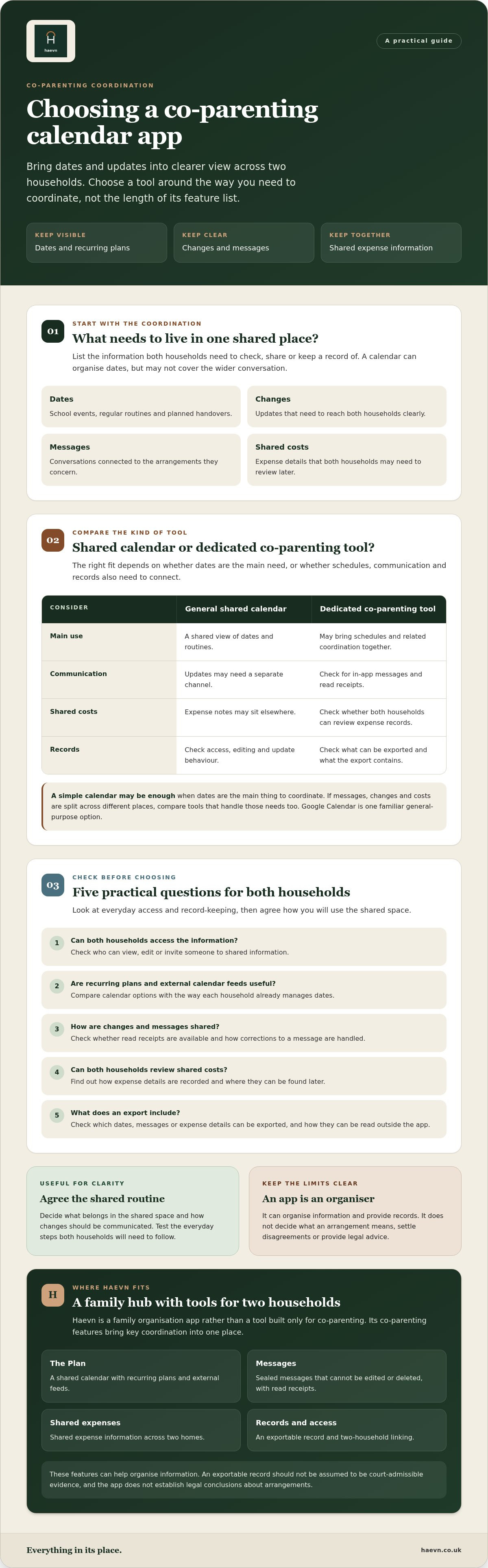
A shared calendar can be enough when the main job is keeping dates visible. If plans sit alongside messages and shared costs, a dedicated co-parenting app may bring more of that coordination into one place. There is no universal winner. Compare the tasks your households need to manage with the features a specific provider actually offers.
| Function | Shared calendar app | Dedicated co-parenting app |
|---|---|---|
| Calendar sharing | Can share dates and, depending on the tool, recurring events. | May include a shared schedule designed for co-parenting plans. |
| Household linking | Access may be managed through the calendar’s sharing settings. | May support linking two households. Check who can join and what they can see. |
| Messages | Usually separate from the calendar, unless the chosen product offers connected communication. | May include in app messaging, read receipts or messages that cannot be edited or deleted. Check how corrections work. |
| Shared expenses | May require a separate tool or manual notes. | May offer a way to record expenses across homes. Check which details can be reviewed. |
| Export options | Vary by product and may focus on calendar information. | May provide a broader export. Check exactly what it includes and how the provider describes it. |
What a general shared calendar can cover
For a routine built around dates, a general calendar may provide a straightforward shared view of events and recurring plans. Do not assume every calendar handles access or notifications in the same way. Check the chosen product’s sharing controls, who can view or edit entries, and how updates reach each household. A shared calendar alone should not be assumed to include message records or shared expense tracking.
What dedicated co-parenting tools can add
Household linking and in app communication may suit families who want schedule updates and messages in a more connected place. Compare any expense and export features with the checklist in the previous section. An export can help with review, but it does not decide what an arrangement means or establish a legal conclusion.
Some households may prefer a calendar plus a separate method for messages or costs. Others may value having fewer places to check. As you compare a co-parenting calendar app UK parents could use, confirm each feature with the provider and consider whether both households can use the same workflow comfortably.
How can you assess whether an app will work for both households?
The best choice is one both households can use in practice. Work through these steps before moving schedules and conversations into a new tool:
- List the needs. Note the essentials, such as handover dates, routine plans, changes, messages and shared expenses. Separate must haves from features you may not use.
- Check access. Confirm both households can open the app on their usual devices. Understand how invitations, permissions and shared information work.
- Review the features. Look at calendar updates, message rules, expense records and export options. Check what each person can view or change.
- Test the workflow. Try adding a routine date, sharing a change, recording an expense and finding the information again. A feature list matters less if the everyday steps are unclear.
For a wider view of Haevn’s family calendar and coordination features, compare the available tools with the needs you have listed. A longer feature list is not automatically a better fit.
Agree what belongs in the shared space
Before adding details, agree what the shared app is for. Essential schedule information might include a date, time and handover location. Optional notes or household details may not need to be shared. Keep personal information to what is needed for coordination, and do not treat monitoring children as a reason to choose an app. Both households should know who can access shared information and what their permissions allow.
Try the workflow before committing
Check that the app works on the devices and platforms each household already uses. Then test the whole sequence together: update a calendar entry, send a message, record an expense and find each item later. If messages cannot be edited or deleted, understand how to clarify a correction before relying on them for coordination. Check the export process too, including what information it contains. Records can help you review what is in the app, but they do not determine what an arrangement means.
A trial period can give both households time to see whether a co-parenting calendar app UK families might use fits their routine. Check the length and terms of the trial with the provider before signing up.
How Haevn helps with this
Haevn is a family hub for organising household life, rather than a tool described as being built specifically for co-parenting. The Plan is its shared family calendar, The Pot is a family budgeting tool, and Family Chat provides private household chat. These tools may be relevant if your priority is bringing family schedules, budgeting and communication together. Before using any family app across two homes, check whether its access settings and intended setup fit your circumstances.
What Haevn includes
The Hub gives an overview of the family’s day. The Plan is for shared calendar planning, while The Pot helps with family budgeting. The Circle manages member invitations and permissions for up to eight members. Haevn also includes The List for shared shopping, chores and routine lists, plus tools for meal planning and household tasks.
Haevn’s features organise household information. They should not be taken as a substitute for co-parenting specific functions such as sealed message records or expense records across two homes. Check the current product details to see whether the app’s features match the way you need to coordinate. An app does not interpret arrangements, provide legal advice or establish legal outcomes.
A straightforward way to decide
Haevn offers a Monthly plan at £6.99 per month and an Annual plan at £69.99 per year. A 30 day free trial is available without a card. The subscription is designed for a family, with up to eight members, rather than individual plans. Use the trial to assess whether its family tools work for your household’s needs, and review the subscription terms before continuing.
Choose a clearer way to coordinate
The right co-parenting calendar app UK households choose is the one both homes can use comfortably and consistently. Before settling on a tool, agree what belongs in the shared space and check how its access, updates and records work. A few clear ground rules can make the arrangement easier to use day to day.
Test the workflow with both households before deciding. If a family organisation app is on your shortlist, make sure its features fit your needs rather than assuming it includes tools designed specifically for co-parenting.
Start Haevn’s 30 day free trial, with no card required.
Frequently asked questions
What is a co-parenting calendar app?
It is a shared digital place for organising schedules across two homes. Depending on the tool, it may also include ways to communicate changes or record shared expenses. A co-parenting calendar app UK parents choose should match the tasks they need to manage, rather than simply offer the longest feature list. It organises information, but does not decide arrangements or provide legal advice.
Can both parents use the same co-parenting calendar app?
Yes, if the app supports access for both households. Before choosing, check how each parent is invited, what information they can see and whether they can edit shared details. It also helps to agree how you will use the app, so both homes know where to check for updates. Access and permissions vary between tools, so confirm the setup with the provider.
Is a shared calendar enough for co-parenting?
It can be, if the main need is to keep dates and routine plans visible. If you also want to organise messages or shared costs, check whether those features are included or whether you will need separate tools. The simplest workable setup may be a calendar alone. Choose according to what both households need to coordinate, not on the assumption that every family needs a dedicated app.
Can co-parenting app messages be changed or deleted?
That depends on the app’s message rules. Some tools offer messages that cannot be edited or deleted, while others may handle messages differently. Check how to clarify an error before using messaging for important updates. A message record can help you review what was written, but it does not establish what an arrangement means or determine a legal outcome.
How much does Haevn cost, and is there a free trial?
Haevn’s Monthly plan costs £6.99 per month and its Annual plan costs £69.99 per year. A 30 day free trial is available and requires no card. Use the trial to check whether Haevn’s family calendar, budgeting and communication tools fit your needs. Review the subscription terms before continuing after the trial, so you understand the price and billing period that apply.