UK co-parenting app alternatives: what to compare in 2026
When dates, messages and shared costs live in different places, coordinating two households can turn into a string of small admin jobs. If you’re comparing co-parenting app alternatives in the UK, the practical question is which setup fits the arrangements both households actually share.
It’s easy for calendars, messages and expenses to end up in separate tools. A general family hub may bring everyday organisation together, but that doesn’t automatically mean it has the records or communication features your co-parenting routine needs. Clear boundaries around shared information matter too.
This guide compares dedicated co-parenting tools with broader family hubs. It looks at schedules, shared expenses, communication and records, then offers practical ways to weigh those features against the needs of both homes. The right next step may be a focused co-parenting tool or a broader way to organise shared family admin.
Key Takeaways
- Compare schedules, expenses, messages and record handling against the routine you share.
- When comparing our family wizard alternatives UK, distinguish dedicated co-parenting tools from broader family hubs.
- Separate essential co-parenting functions from household features that would simply be useful.
- Review how access, shared information and records work across both households before choosing.
- Haevn includes sealed messages, read receipts, shared expenses across two homes and an exportable verified record. These features do not replace legal processes.
Why look for a co-parenting app alternative in the UK?
Coordinating two homes can mean checking one calendar for handovers, searching messages for a change of plan, then opening another tool to see who recorded a shared expense. Even when communication is civil, these small admin tasks take time and can make it harder to find the latest information. The challenge isn’t simply finding more features. It’s deciding what needs to be shared, where it belongs and whether both households will use the same system.
Alternatives might mean another dedicated co-parenting tool or a broader family organisation app with co-parenting features. The term covers different ways of managing shared responsibilities, as the general overview What is Co-parenting? explains. Neither category suits every family arrangement or communication preference. Some parents value a focused space for co-parenting; others want to coordinate a wider set of family tasks in one place. If you’re weighing our family wizard alternatives UK, start by identifying where your current routine creates extra steps.
When a dedicated co-parenting tool may feel too narrow
A specialised tool may suit families whose main need is keeping co-parenting arrangements organised. But if it doesn’t cover other household routines you share, you may still need a separate calendar for clubs, a list for items to pack between homes, and another place to track bills or purchases. That can mean repeating details or switching between tools to get the full picture.
For some families, that separation is useful. A focused tool can keep co-parenting communication and records apart from wider household admin, which may feel clearer and more appropriate. There’s no need to combine everything just to reduce the number of apps. Consider whether the extra tools are a genuine burden, or whether keeping tasks separate better reflects the boundaries you want.
When a broader family hub may be worth comparing
A family hub may be worth considering if the shared workload goes beyond arrangements between parents. You might want a central place for recurring household tasks, shopping lists or bills alongside the co-parenting functions you rely on. That could mean fewer separate calendars and reminders to maintain. Families looking for ways to organise busy family routines may recognise that wider household admin matters too.
Still, a broader set of tools doesn’t automatically meet every co-parenting need. A shared calendar is not the same as a record of messages, and a task list won’t tell you how expenses are handled across two homes. Compare each function on its own terms, including who can see shared information and what happens to records. The aim isn’t to choose the biggest bundle. It’s to find a setup both households can use for the tasks they share, while keeping other responsibilities separate where that feels right.
Which co-parenting app features matter across two homes?
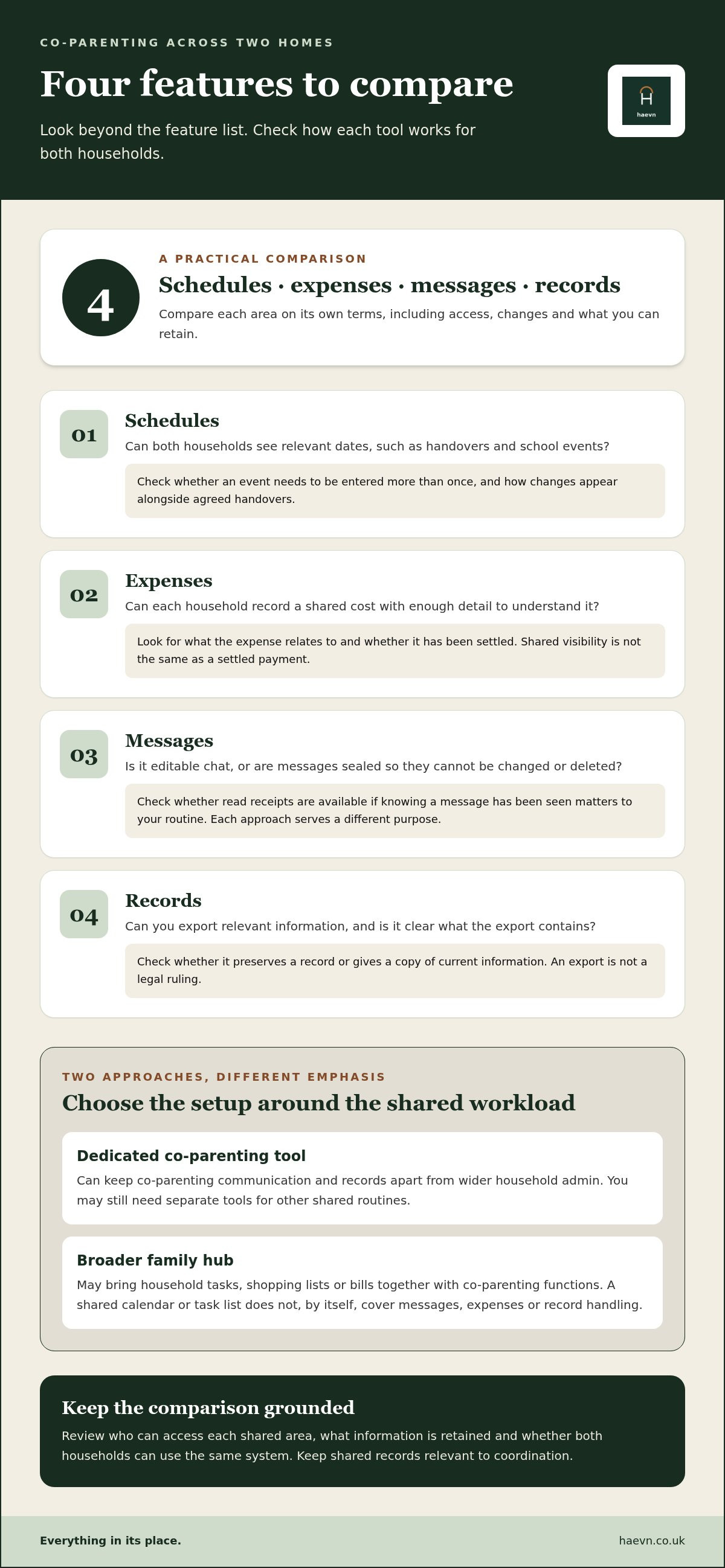
Compare what each feature does in practice, not just whether it appears on a list. Shared access lets both parents see or add information. Record handling is a separate question: can a message be edited or deleted, and can communication be exported later? Those differences matter if you need a reliable shared reference, rather than simply a place to exchange everyday updates.
Feature What to compare
Schedules Can both households add and see relevant dates, such as handovers and school events? Do you have to enter the same event more than once?
Expenses Can each household record a shared cost and see enough detail to understand it, such as what it relates to and whether it has been settled?
Messages Is the conversation editable chat, or are messages sealed so they cannot be changed or deleted? Are read receipts available if knowing a message has been seen matters to your routine?
Records Can you export relevant information, and is it clear what the export contains? Does it preserve a record or simply provide a copy of current information?
Shared schedules, expenses and messages
A useful schedule should show both households the dates they need without creating duplicate entries. Think through a typical change: one parent adds a school event, and the other needs to see it alongside the agreed handover. Check how the tool represents changes and whether both parents can access the same calendar view.
For expenses, consider how you would record an item that relates to both homes, such as a school cost. Shared visibility is not the same as a settled payment, so look for clear status information. With messages, editable chat may suit flexible, everyday conversation. Sealed messages serve a different purpose: once sent, they cannot be edited or deleted. Neither approach is automatically right for every family.
Records, privacy and clear boundaries
An exportable record can help you retain messages or expense details outside the app, for reference or to organise your own files. It is not a legal ruling, and an export alone cannot promise how information may be treated in a legal process. For official information about child arrangements, see the UK Government Guidance on Child Arrangements.
Before choosing among our family wizard alternatives UK, consider who can access each shared area and what you intend to keep there. Read the service’s privacy information and look for a clear account of how it handles personal information, including whether it is built to UK GDPR standards. Keep shared records relevant to coordination, rather than treating an app as a legal or case-management service. You can also review how co-parenting features are described, then compare them with your priorities.
For a practical sense of how shared messages and expenses can sit together, view the family hub alongside the criteria above.
Co-parenting apps vs family hubs: how do they compare?
The main difference is focus. A dedicated co-parenting app centres on tasks between parents, such as coordinating arrangements, sharing expenses or keeping communication in one place. A family hub may include some co-parenting functions alongside wider household organisation, such as shared lists, bills and recurring tasks. Neither label tells you exactly what a particular app can do, so compare the functions that matter to your routine.
When comparing our family wizard alternatives UK, separate three questions: what both households need to coordinate, what needs to be recorded, and whether wider family admin belongs in the same tool. A dedicated app may be a better fit if the co-parenting workflow is the priority and other household tasks are already organised. A hub may suit parents who want to bring some shared family admin together, provided it also covers the co-parenting functions they rely on.
What a shared calendar can and cannot cover
A shared calendar can make dates easier to coordinate. For example, both parents might add handovers, school events or recurring clubs to one shared view rather than copying dates into separate personal calendars. Google Calendar is a familiar example, but a calendar alone is not a complete co-parenting system.
Calendar access doesn’t, by itself, provide shared-expense handling, sealed messages or an exportable record of communication. These are separate functions to assess, not features to assume. If your main challenge is avoiding clashes between dates, a shared calendar may be enough. If you also need a structured way to manage expenses or retain communications, compare tools that address those needs directly.
What to weigh before switching tools
Consider the workflow from both sides. Can each household access the information it needs and contribute without relying on one parent to transfer updates between apps? A tool that works well for one person but doesn’t fit the other household’s everyday habits may leave the same coordination gaps in place.
Then look at the admin involved. Separate tools can work well if each has a clear purpose and both parents know where to find key details. But if a date is in one calendar, a shared cost in a spreadsheet and a decision buried in chat, keeping track of everything may take more effort than the tools save. A hub can bring different tasks together, but only if its specific co-parenting functions meet your needs.
There’s no automatic benefit to moving everything. Compare the tasks you actually share, the records you want to keep and the boundaries you prefer between co-parenting and wider household information. For more detail on the functions used to coordinate co-parenting tools for two homes, use those needs as your comparison checklist.
How to choose an alternative that fits your family
Start with your routine, not the app category. Write down what the adults need to coordinate, mark which tasks are essential, then consider whether a dedicated co-parenting tool or a broader family hub fits best. This helps keep optional extras from distracting you from the functions both households depend on.
Start with the tasks both households need to coordinate
List the dates, expenses and communication that need to be shared. For example, you might need a joint view of handovers and school events, a way to record shared costs, and a clear place for messages about changes. Be specific about what each parent needs to add, see or retain.
Next, separate core co-parenting functions from useful household extras. A shared shopping list may help with wider family admin, but it won’t replace a communication record if that is a priority. Share only information that serves a clear coordination purpose. Children’s privacy matters too.
Check the practical fit before committing
Look at how access works for each household, whether relevant information can be exported, and what the subscription terms say about billing and cancellation. Read the details in plain language. If you’re comparing our family wizard alternatives UK, assess whether the setup gives both adults a workable way to handle their tasks without repeatedly copying dates or updates between tools.
Try the routine on a small scale before moving every family task. Use the chosen setup for a typical week or one recurring arrangement. Notice whether both adults can find what they need, whether updates are easy to enter and where duplicate work remains. Keep other routines where they are until you know the new arrangement suits you.
Then review the result together, if that’s practical. Which steps became clearer? Which information still needs another home? A tool doesn’t need to hold every detail to be useful. The aim is a shared process that fits the responsibilities you’ve agreed to coordinate, with private or unrelated household information kept separate where appropriate.
Some families also want to organise tasks beyond co-parenting. If that applies, consider how support for busy families might fit alongside the specific arrangements shared between two homes, rather than assuming every household task belongs in the same place.
Once you’ve set your priorities, you can try a shared family hub routine and see how it fits the tasks you’ve chosen.
How Haevn helps with this
Haevn brings co-parenting tools and wider family organisation together in one family hub. Its co-parenting features include two-household linking, shared expenses across two homes, read receipts and sealed messages that cannot be edited or deleted. There is also an exportable verified record, described as tamper-resistant. It preserves information, but does not determine how that information may be treated in a legal process.
Where co-parenting tools sit within the wider family hub
The Plan supports shared family scheduling, while The Pot is for manual budgeting. These household tools can sit alongside co-parenting functions, but they don’t replace specialist legal or mediation support.
The service is not legal advice or a court service, and it doesn’t control smart-home devices. It is built to UK GDPR standards. Keep shared information focused on the arrangements you want to coordinate.
A calm way to decide whether it fits
Compare your priority tasks with the live features, then consider whether both households can use the arrangement in practice. You could begin with one routine and see whether the shared information is easy to find and maintain. There’s no need to move every family task at once.
A 14-day free trial is available with no card required. Use it to consider whether the features fit your needs, without expecting an app to resolve disagreements or replace professional support.
Start your free trial. 14 days free, no card required.
Choose the routine you can both maintain
The right setup supports the way both households actually coordinate, not simply the one with the most features on paper. Before making a change, agree which tasks belong in the shared space, who will keep information up to date and what each of you prefers to keep separate. A clear arrangement can matter more than adding another tool.
As you weigh our family wizard alternatives UK, focus on a practical next step: try the smallest part of the routine that matters, then see whether it feels clear and manageable for both adults. You can adjust from there. There’s no need to move every family detail at once or expect an app to settle wider disagreements.
If you’d like to see whether a family hub suits your routine, take a measured look and decide for yourself. Start your free trial. 14 days free, no card required.
A calmer system begins with one useful change, chosen to fit your family.
Frequently asked questions
Is a dedicated co-parenting app better than a shared calendar?
Not for every arrangement. If your main challenge is keeping a predictable weekly pattern visible, a shared calendar may be sufficient. If plans change often or you need more structured coordination, a dedicated tool may suit better. Think about the decisions you make in a typical month, then choose the simplest setup that helps both households follow the agreed routine without adding unnecessary steps.
Can Google Calendar work as an alternative for co-parents?
It can be a practical option for dates, especially if both parents already use it. Agree a clear naming convention, such as putting the type of event first, so entries are easy to scan during a busy week. Google Calendar is for calendar coordination; it doesn’t provide co-parenting functions such as shared expenses, sealed messages or exportable records. Choose it for dates, not as a complete co-parenting workflow.
Do both households need to use the same co-parenting app?
Anyone expected to contribute to a shared workflow needs a way to take part in it. Before choosing, agree which parent will add information, who needs to see it and how you’ll handle an update if someone can’t access the shared space. Keep a simple fallback for time-sensitive changes, and decide what belongs in the app rather than assuming every family detail should be shared.
Can an app record shared expenses between two households?
Some tools let parents record shared expenses. Before relying on one, consider what will make an entry understandable later, such as the date, what the cost relates to and any agreed split. Check how the information can be exported and whether the export is clear enough for your own records. Recording a cost doesn’t decide who owes what or means reimbursement.
Can an exported co-parenting record determine how a court views information?
No. An export preserves information; it doesn’t amount to a court ruling or assure how that information may be treated. If you’re keeping a record, understand what the export contains and retain it somewhere you can find again. For questions about legal proceedings or how a record may be used, seek advice from an appropriately qualified professional.