Private family management app: choosing a secure option
Monday morning, the school update is in one chat, the appointment is in a calendar and the shopping note is somewhere else. A private family management app might bring these details together, but “private” on a label doesn’t tell you who can see information or what the app can actually help you manage.
It’s reasonable to want one calmer place for family updates and everyday household admin. But a family chat app and a wider coordination hub aren’t the same thing, and privacy claims deserve a closer look than a reassuring phrase on a website.
This guide explains how to compare options by checking access controls, privacy information and practical features. You’ll learn what to look for in private communication, how to tell whether an app supports shared calendars, lists and household records, and where its limits lie. The aim is a clear next step based on what your household needs, without relying on unverified security claims.
Key Takeaways
- Map where family messages, plans and household details currently sit to see what you need in one shared space.
- Assess a private family management app by checking access, permissions, data handling and account recovery, not just broad security claims.
- Compare messaging-only apps, shared calendars and wider family hubs by the household tasks each one supports and its limits.
- Separate essential features from nice-to-haves, then test whether the app suits the people who will use it.
- Check how member invitations and permissions work before deciding who to include in your household space.
Why choose a private family management app for everyday communication?
A changed pick-up time arrives in one chat. The shopping reminder is on a scrap of paper, and the household plan sits in a calendar not everyone checks. The difficulty isn’t a lack of messages. It’s that useful information is scattered, so someone has to repeat it or work out where it was shared.
A private family management app is a shared household space that brings communication together with tools for coordinating everyday life. Depending on the app, that might mean chat alongside plans, lists or household information. “Private” describes who the service is intended for and how access is managed. It isn’t a promise of absolute security. Check who can join, what permissions are available and what the provider says about handling data.
It also helps to be clear about the purpose. Family coordination is about sharing household updates and practical arrangements. It isn’t the same as personal messaging, parenting advice or software designed to manage children’s online activity. For a general overview of that separate category, see parental control software.
What does a family management app bring together?
In a broader household app, a conversation can sit close to the plan or task it relates to. Someone can share a change of plans, add a shopping reminder, or check a household arrangement without having to reconstruct the details from several places. A shared view can reduce repeated updates because people have a common place to look. It won’t take every decision or task off your hands, though. The benefit depends on what the app includes and whether the household uses it consistently.
Is a family app the same as a messaging app?
A messaging app centres on conversations. A family hub can connect chat with shared tasks and household information, giving practical updates more context. That distinction matters: a chat message can say that plans have changed, while a shared calendar may show the new arrangement. Neither approach suits everyone. You might keep personal conversations in a separate service, or use a familiar calendar alongside a family app. Choose based on the gaps you want to address, not the promise that one app can replace every channel.
How to assess privacy in a secure family communication app
Privacy claims are most useful when they tell you what a service actually does. Treat words such as “secure” as a prompt to look for detail, not as proof that every risk has been removed. A privacy commitment is a description of a provider’s approach, not a means of risk-free use.
Before signing up, check the current privacy information and look for clear answers to these questions:
- Access: Who can join, and how are invitations sent and accepted?
- Permissions: Can members have different levels of access, and can those permissions be changed?
- Data handling: What information does the service collect, how long is it kept, and how can it be deleted?
- Account recovery: What happens if someone loses access to their account? Check that the recovery process makes sense for your household.
- Product limits: Does the provider clearly explain what the app does not do, as well as what it offers?
Which privacy questions should families ask before signing up?
Consider what you plan to share and who needs to see it. An app may suit a household that wants shared plans but not one that expects every member to have the same access. Check how invitations work, whether permissions can be managed, and whether the provider’s explanation of data collection, retention and deletion is easy to find. If those details are vague, ask the provider before adding personal information.
For services likely to be accessed by children in the UK, the ICO’s Children’s Code is relevant context to consider. The FTC’s Children's Online Privacy Protection Act page explains a US law, so it shouldn’t be treated as a guide to UK requirements. Focus on the provider’s own explanation of how it handles information and whether that fits your family’s preferences.
What do encryption and UK GDPR wording tell you?
“Encrypted in transit” means information is protected while being sent between your device and the service. “Encrypted at rest” means it is protected while stored. These phrases describe particular protections, not every aspect of account access, recovery or data handling. Check that any encryption claim matches the provider’s published wording and scope.
If a provider says its service is built to UK GDPR standards, read that alongside its privacy policy. The phrase isn’t a substitute for understanding what information is collected, how it is used or what choices you have. A careful review helps you decide whether the stated protections and product limits meet your household’s needs.
Family chat app or all-in-one hub: how do they compare?
The main difference is what the app helps your household do after a message is sent. A messaging-only app keeps conversation together. A shared calendar gives everyone a place to check dates. A broader family hub may connect communication with plans, lists and other household information. The right fit depends on where your current tools fall short.
| App category | Shared context | Household organisation | Privacy information to check | Likely limitations |
|---|---|---|---|---|
| Messaging-only app | Conversations and shared updates | Usually centred on chat rather than household tasks | Who can join, how access works, and how messages and account data are handled | Schedules, documents and task tracking may need separate tools |
| Shared calendar app | Events and dates, such as a shared Google Calendar | Useful for coordinating schedules; other household admin may sit elsewhere | Who can view or edit the calendar and what the provider says about data handling | Conversation and wider household information may not be part of the same space |
| Broader family hub | May connect chat with shared plans and household tasks | Can bring several types of coordination into one place | Review invitations, permissions, data handling and the limits stated by the provider | More features may be unnecessary if your household only needs chat or a calendar |
When is a dedicated family chat app enough?
If the main challenge is keeping everyday family conversations in one shared place, a dedicated chat app may be enough. It can give household updates a clear home without asking everyone to change how they organise plans. Bear in mind that schedules, documents or task tracking may still need separate tools. Not everyone has to use one channel for every kind of conversation.
When might a family management app fit better?
A private family management app may suit a household that wants chat to sit alongside shared plans and routines. That connection can make it easier to find the relevant task or arrangement without searching through unrelated messages. In return, consider whether bringing more household information into one service feels useful, and review its privacy details. Keeping separate tools is a reasonable choice too.
Compare the number of places your household uses now with the features you’d genuinely use. For details on what a family hub can include, see the family hub features overview.
How to choose a private family management app that fits your household
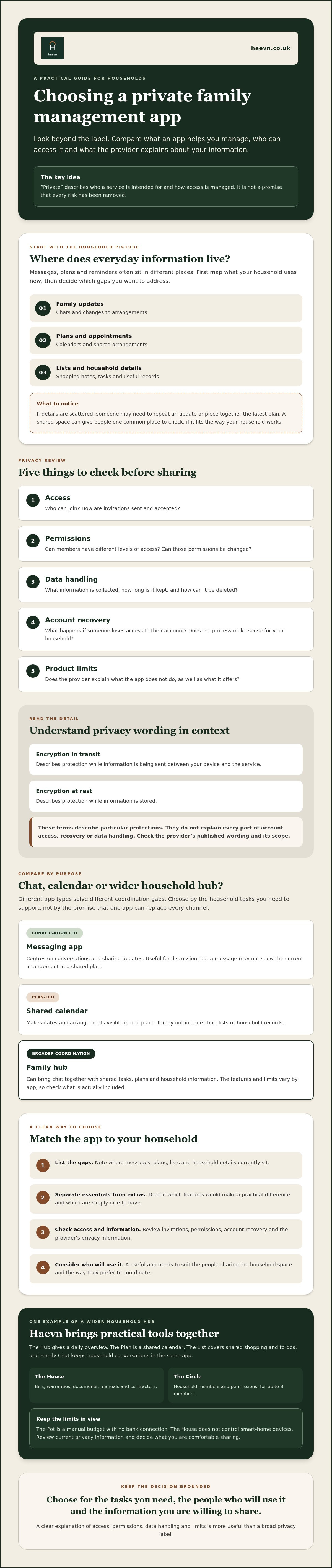
Choose around the way your household actually shares information, not the longest feature list. Before comparing apps, separate must-haves from useful extras. A short list makes it easier to spot a practical fit and avoid signing up for tools you won’t use.
- List your needs. Note the admin that currently takes effort to coordinate. Decide whether shared chat, recurring plans, shopping lists or household information would help.
- Identify the users. Who will manage the household account, and who needs access? Consider whether members need different permissions.
- Check privacy details. Read the current privacy information, and look for clear explanations of access, data handling, account recovery and deletion.
- Compare the fit. Mark each feature as essential or nice to have. Ask whether the app supports one household’s coordination or whether you need tools designed for co-parenting across two homes. If the latter applies, review the co-parenting information.
- Test the setup. With the adults who will manage the account, try invitations and permissions. Check that the steps are understandable and access works as you expect.
Which features matter for your family’s communication?
Consider each need separately. Household chat helps keep conversations together; recurring plans support routines; shared lists help coordinate tasks; member permissions shape who can access the space. Don’t assume that every family member wants to use one channel for every topic. For a broader starting point on organising household admin, see this guide for busy families.
How can you try an app without overcommitting?
Before starting a trial, check its length, whether payment details are required, how cancellation works and what support is available. A 14-day trial without a card is one option, but a trial isn’t the same as a permanent free tier. Read the terms so you know what happens when it ends.
Check the access method too. Does the service work in a browser, and is a native iOS or Android app currently available? Try it on the devices your household would use, then see whether the everyday tasks feel clear enough to keep using.
If you’re ready to test a household setup, open the sign-up page.
How Haevn helps with this
Haevn is a family hub with Family Chat for private household chat, alongside shared tools for organising day-to-day life. It’s designed as more than a messaging-only app, but it isn’t a dedicated secure messenger. Haevn states that data is encrypted in transit and at rest, and that the service is built to UK GDPR standards. These details can help you compare a private family management app with your household’s needs, but they don’t replace reviewing the provider’s privacy information.
What does Haevn include for family communication and coordination?
Family Chat sits alongside practical household features, so conversation and organisation can share a home. The Plan is a shared calendar with recurring events and external feeds. The List covers shared shopping and to-dos. The Circle manages member invitations and permissions for up to eight members, giving the household a way to organise who has access.
That combination may suit families looking to bring routine coordination into one place. It doesn’t mean every conversation needs to move into the app, or that it serves every household’s communication needs. Family Tracking is not yet launched.
What should you know before trying Haevn?
Haevn works through a browser. Open app.haevn.uk and use Add to Home Screen for access from your device. Native iOS and Android apps aren’t yet available.
The trial lasts 14 days and doesn’t require a card. Haevn is a paid service, with no free version or individual plans. Check the current terms and privacy information before you start, and consider whether the shared features and access arrangements suit your household.
Start your free trial. 14 days free, no card required.
Choose a shared space that suits your household
The right choice depends on what your household needs to coordinate, and what you’d rather keep separate. A private family management app can bring communication and household organisation together, but check its permissions, data handling and stated limits before deciding. “Private” describes intended access, not a promise that using an app is risk-free.
Compare the options against your routines. A chat app may be enough if conversation is the main need; a wider hub may help if you also want shared plans and lists. Look for clear privacy information, then test whether the setup feels straightforward for the adults who’ll manage it.
Haevn combines Family Chat for private household chat with shared household tools. The Circle manages invitations and permissions for up to eight members. Its 14-day trial requires no card, giving you time to explore the setup and decide whether it fits. It’s a paid service, not a free app.
Start your free trial. 14 days free, no card required.
Frequently asked questions
Is a private family management app the same as an encrypted messaging app?
No. A family management app may combine household chat with tools such as shared plans and lists, while an encrypted messaging app centres on messages. Check what the provider means by encryption. Protection in transit and at rest describes information being sent and stored, but doesn’t by itself mean using an app is risk-free or confirm end-to-end encryption.
Can a family communication app replace a shared calendar?
Only if it includes a calendar that meets your household’s needs. A chat-focused app may leave you needing a separate calendar for dates and recurring plans. Check whether events are shared and easy to update. If coordinating dates is your main need, a shared calendar app may be enough.
How do I check whether a family app protects household information?
Read the current privacy information. Look for what data is collected, how it is used, how long it is kept and what deletion options are available. Check who can join, how permissions work and how account recovery is handled. Clear explanations help you judge whether the app suits your household.
Can family members have different permissions in a shared family app?
Some apps allow different permissions; others give members the same access. Check the available controls before inviting family members. The Circle manages invitations and permissions for up to eight members. Consider whether those options match how your household wants to share information.
Is the family hub available as a native iOS or Android app?
No. Native iOS and Android apps aren’t yet available. The service works through a browser at app.haevn.uk. Open it on your device and use Add to Home Screen for easier access. If a native app is essential, check current platform details before choosing a service.
Is there a free trial without a credit card?
Yes. The trial lasts 14 days and doesn’t require a card. It gives you time to explore the shared household features and decide whether they suit your needs. The service is paid, with no free version or individual plans. Check the current terms before starting.