Parenting tech: a calmer way to organise family life
Monday morning: a school message sits in one inbox, an appointment is buried in a calendar and someone is trying to remember who’s collecting the children. Technology to simplify parenting should make these handovers clearer, not add another stream of notifications to manage.
When plans and reminders live in different places, the work of keeping everyone informed can fall to one parent. A shared system can help, provided it makes information easier to find rather than adding another app to maintain or sharing more family information than necessary.
This guide looks at practical ways to match technology to household tasks, from shared calendars and lists to routines that make plans easier to see. It also covers useful boundaries and privacy. An app can support family coordination, but it can’t replace parenting or the conversations that help a family decide how things should work.
Key Takeaways
- Choose technology to simplify parenting by matching each tool to a specific household task.
- Shared calendars, lists and meal planners can make everyday plans easier for the family to see and update.
- Compare tools by shared access, permissions and notification settings, as well as the job they help with.
- Start with one point of friction, agree what belongs in the tool and try the routine before adding another.
- Use technology to support family coordination, while keeping privacy and parental judgement in view.
How can technology simplify parenting without adding more admin?
A school date arrives by email, a dentist appointment sits in one parent’s calendar and the shopping list is on the kitchen counter. Then come the questions: who’s collecting, what needs buying and has the other parent been told? Technology to simplify parenting should make these details easier to share, not create another place for one person to maintain.
Family technology works best as a shared aid for coordination. It can make agreed plans and responsibilities easier to see, but it can’t provide care, make decisions for you or correct an uneven division of household work by itself. The aim is to cut repeated handovers and make responsibilities clearer, without adding unnecessary screen time.
In brief: A shared place for agreed plans, routines and practical details means family members can check information for themselves, rather than relying on one person to pass it on.
Which everyday pressures can a shared system ease?
Consider the details that come up repeatedly: a school appointment, ingredients for dinner, a supermarket shop or a regular club run. A shared calendar can show when something is happening. A shared list can hold shopping or tasks. A meal planner can show what’s planned for dinner and what ingredients are needed.
The app doesn’t take responsibility for these tasks. Instead, family members can find information that has already been agreed, rather than relying on one person to remember it, repeat it and answer follow-up questions. For parents coordinating between homes, a shared reference point can also help make practical handovers clearer. Read more about co-parenting coordination.
When does another app become another job?
A tool adds work when the same appointment has to be entered in two calendars, alerts keep interrupting or only one parent updates the information. If everyone still needs to ask that person what’s happening, the details aren’t genuinely shared. Start with a household need, then choose a tool that fits it. Agree who updates it, what belongs there and which notifications are useful.
Some digital controls, such as filters or limits on device use, relate to children’s access to online content rather than household coordination. The overview of parental control features explains that separate category. For family organisation, keep the test simple: does the tool make an existing routine easier, or is it another place to check?
Useful coordination gives everyone a clearer view. App accumulation gives everyone another thing to manage.
Five types of technology that can support everyday family life
Different tools support different jobs. A shared calendar makes dates visible to the family; an individual reminder app may only alert the person who set it. Choose tools that let the family members who need the information find and update it without relying on one person to pass it on.
Shared calendars, lists and household information
- Shared calendars: Keep appointments, school events and recurring routines in one view. Add who needs to know or take action, so a date is more useful than a reminder on one person’s phone.
- Task and shopping lists: Collect the food shop, household errands and to-dos in a shared list rather than scattering them across messages. Anyone can add bread or washing-up liquid when they notice it’s running low.
- Household information organisers: Keep practical details such as bill dates, appliance manuals or warranty information where the relevant adults can find them.
Budgeting, meals and family communication
- Household budget tools: Make planned spending and shared expenses visible to the people managing them. A manual budget can help the household review regular costs together without relying on separate messages.
- Meal planners: Organise dinner decisions for the week and note ingredients already at home. This makes it easier to plan around food that needs using. Some planners offer AI suggestions for meal ideas.
- Family communication tools: Give practical updates a shared place, such as a chat for confirming a change to a collection plan. Put dates or tasks in the calendar or list as well, so important details aren’t buried in a conversation.
These categories can work together, but they don’t all need to be separate apps. A calendar, a list and a clear communication routine may be enough to start. For meal ideas and planning, a family meal-planning guide can help you decide what would suit your week. Yale School of Medicine also offers advice on how parents can help kids thrive in a digital world, including the role of family habits around technology.
If a shared place for household organisation would help, explore a family hub.
How to choose family technology that fits your household
The right tool is one your family can keep using. A long feature list matters less than whether it solves a shared problem, is easy to update and makes responsibilities clearer. Treat the choice as a practical decision, not a reason to digitise every part of family life.
| Tool type | Household job | Question to consider |
|---|---|---|
| Shared calendar | Keep plans and recurring events visible | Can the people who need the details view and update them? |
| Shared list | Collect shopping and household tasks | Is it easier to add an item here than send another message? |
| Budget tool | Make planned household spending visible | Can the adults managing the budget understand and maintain it? |
| Meal planner | Organise meals and ingredients | Does it fit the way your household plans and shops? |
| Family communication tool | Share practical updates | Can important details be found again when needed? |
Does the tool solve a real shared task?
Start with one recurring point of confusion. Perhaps a changed collection plan gets missed, or two people buy the same item. Compare a proposed tool with what you already use: a paper list on the fridge, a familiar calendar or a quick conversation may already do the job. Keep the method your family can realistically maintain. If updates depend on one person or the tool creates duplicate work, it may not be the right fit.
For more ideas on organising busy household routines, read this guide for busy families.
Are access and privacy choices clear?
Before adding family details, make sure the adults understand what information is shared and who can access it. Look for permissions that suit each person’s role, and set age-appropriate boundaries around what children can see or use. Share relevant plans, not information for monitoring children.
Consider notifications too. Keep alerts that prompt someone to act, such as a reminder about a change, and switch off those that simply repeat information everyone can already see. The simplest tool that supports a real family task and fits your routines is often the easiest to keep using.
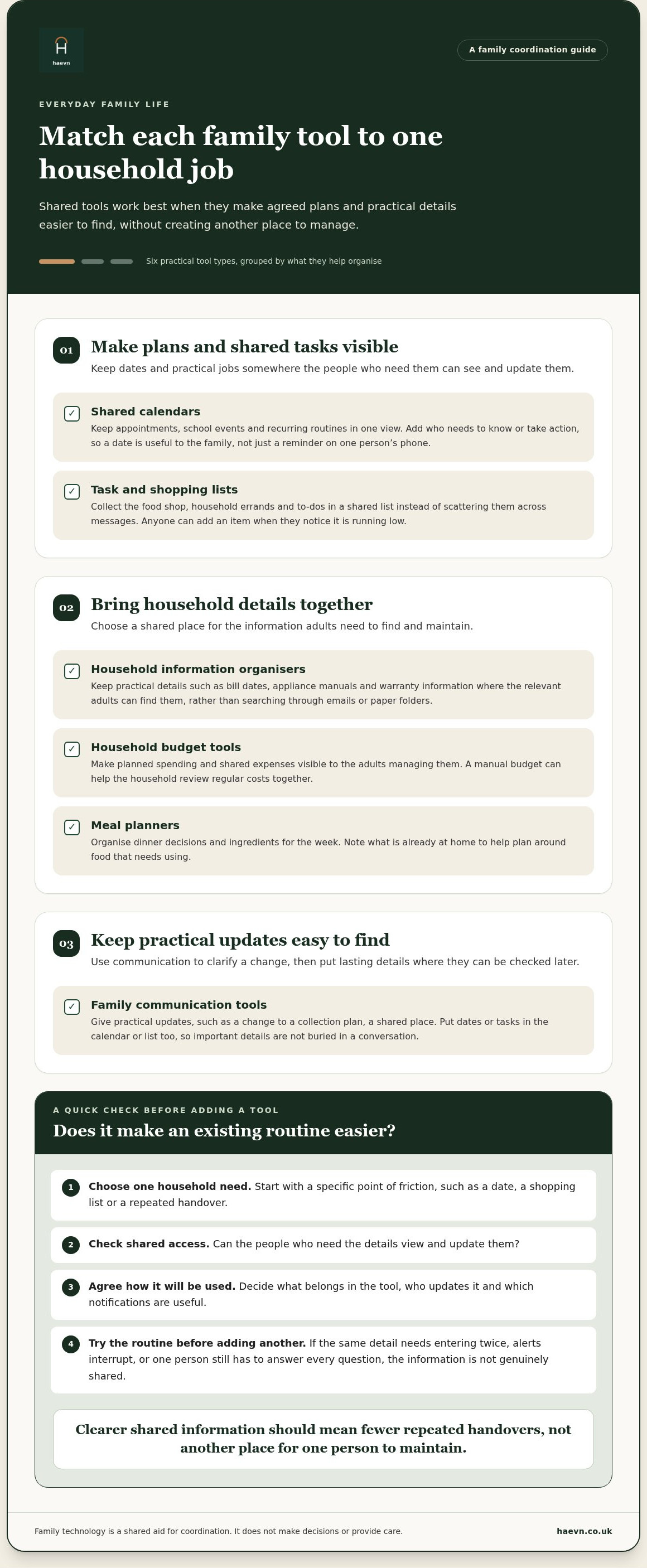
A simple way to introduce technology into family routines
A new family tool works best when it supports a routine you already have. Start small. Agree what goes into the shared space, who will keep it up to date and which alerts are useful. Try that routine before adding another kind of household admin.
Start with one routine the family already has
Choose one recurring friction point, such as coordinating a weekly shop, checking a regular appointment or deciding what’s for dinner. Don’t redesign the whole household at once. A small trial makes it easier to tell whether the tool helps or simply adds another step.
Before you begin, agree on a few practical details:
- What belongs there: Decide whether the shared space holds dates, tasks, shopping items or meal plans. Keep unrelated information elsewhere.
- Who updates it: Make the responsibility clear and shared where appropriate. If one person maintains the system for everyone, the mental load may remain much the same.
- Which alerts matter: Keep notifications for changes or actions that need attention. Turn off routine alerts that add noise without helping.
After trying the routine, have a calm check-in. Is the information easy to find? Are the people who agreed to make updates doing so? If something feels awkward, adjust the routine before adding another category. Technology should fit around family life, not become another household project.
Set boundaries for family technology
Decide where different conversations belong. A quick update may suit family chat, while a date or task is easier to find later in a calendar or list. Agree what information to share and who can access it. With children, keep boundaries age-appropriate and focused on useful family information, not monitoring.
A shared calendar or task list can make responsibilities more visible, but it can’t show whether care work is divided fairly. Use it as a prompt for a real conversation about who remembers, plans and follows through. A useful first step may be naming the work that often goes unseen.
For parents coordinating across two homes, choose a routine that keeps practical arrangements clear between households. Read more about co-parenting coordination.
Keep the trial simple: one routine, clear responsibilities and only the alerts you need. If a shared space would help your household put that into practice, explore a family hub for household routines.
How Haevn helps with this
A shared family hub brings plans, lists and routines together, so family members can check practical details without relying on one person to pass on every update. It supports coordination, but it doesn’t make parenting decisions or replace conversations about how the household works.
What can a shared family hub bring together?
The Hub gives a daily overview. The Plan holds the shared calendar, including recurring events and external feeds. The List brings shopping and to-dos together, giving the household a place to check what’s needed or what still needs doing.
Chores makes agreed household tasks visible, while Family Chat gives family members a place for practical updates. These tools don’t replace a conversation about who is responsible for a task or whether a routine is working. The Circle supports up to eight family members and lets you set member permissions.
Meal Planner helps organise meal decisions, with AI suggestions and use-it-up ideas. The House organises bills, warranties, documents and manuals. It’s a home information organiser, not a way to control smart-home devices.
What should families know before starting?
The Pot is for manual budgeting. It doesn’t connect to bank accounts, by design, so household spending information is entered manually.
The service is built to UK GDPR standards, with data encrypted in transit and at rest. As with any shared household tool, agree what information belongs there and who should have access. Start with one routine and use the features that support it. You don’t need to adopt everything at once.
The 14-day free trial requires no card. If a shared space for plans, lists and household routines sounds useful, you can start here:
Start your free trial. 14 days free, no card required.
Make room for more time together
Technology to simplify parenting works best when it gives the family a clearer way to share plans, tasks and everyday information. Start with one recurring source of friction, choose a tool that everyone who needs it can use, and agree who keeps it up to date. A shared calendar or list can make responsibilities easier to see, but it can’t replace conversation or care.
A family hub brings plans, lists, meals and chores into one shared space. The Circle supports up to eight family members, so household information can be shared with the people who need it. The aim isn’t to move family life on to screens. It’s to spend less time passing details around and more time together.
A 14-day free trial, with no card required, gives you time to try the household tools. Start with one routine and see whether a shared space suits your family.
Frequently asked questions
What technology can help parents organise family life?
Shared calendars, shopping and task lists, meal planners, household budget tools and family communication apps each support different needs. A calendar can hold appointments and recurring events, while a shared list gives family members one place to check shopping or tasks. A family hub can bring several household jobs together. Choose tools that suit your existing routines, rather than adopting features just because they’re available.
Can technology reduce the mental load of parenting?
It can reduce some of the remembering and repeated reminding by making agreed plans easier for family members to find. A shared calendar, for example, can make dates visible. But technology to simplify parenting can’t decide who takes responsibility or make an uneven workload fair by itself. Agree who updates information and follows through, then talk together about whether the arrangement works for your family.
Are family organisation apps safe to use?
Check how an app handles information before adding family details. Read its privacy information, consider who can access shared content, and limit permissions and notifications to what you need. Be especially thoughtful about information concerning children. Look for clear explanations of data handling and security, and share only what’s useful for the household.
How do I introduce a new app to my family?
Start with one routine that causes confusion, such as organising a regular shop or keeping plans up to date. Agree what belongs in the shared space, who will update it and which alerts matter. Invite the family members who need access, then try the routine before adding another task. Check in afterwards and adjust what isn’t working rather than maintaining duplicate systems.
Do parents need a separate app for every family task?
No. A familiar calendar, paper list or shared family hub may cover the tasks that matter to your household. Separate tools can suit distinct needs, but they can also mean more places to check and update. Begin with the simplest setup your family can maintain. Add another tool only when there’s a clear job for it that your current approach doesn’t cover.