Justifying the cost of a family management app: what to compare
What would one shared family app need to replace before its monthly cost feels sensible? When justifying cost of family management app subscriptions, the answer isn’t simply the price on the screen. It’s whether one place could bring together the calendars, shopping lists and household details currently spread across different tools, and whether everyone would use it.
It’s reasonable to hesitate over another recurring payment, especially when the benefits are hard to pin down. There’s also the quieter cost of keeping everything in sync: remembering what’s where, updating plans and prompting others to check them. If one person carries most of that coordination, a lower subscription total may not tell the whole story.
This article offers a practical way to compare the real cost of separate tools with one shared subscription. You’ll identify which household tasks would genuinely benefit from a central place, then weigh the likely value against your family’s actual habits. There’s no need to replace every app. The aim is a clearer basis for deciding whether one belongs in your budget.
Key Takeaways
- When justifying cost of family management app subscriptions, compare what your household actually pays for separate tools, not assumed market averages.
- List the recurring tasks that create the most friction, then focus on tools your family would genuinely share.
- Weigh subscription cost against the setup and attention a new app would need from your household.
- Try one routine, such as weekly planning or shared shopping, to see whether a central place fits how your family already works.
What does a family management app need to justify its cost?
Plans, shopping lists and household decisions often sit in different places. A family app can bring some shared tasks together, but it won’t necessarily replace every tool. Its value depends on whether the routines it supports justify the subscription, setup and attention needed to keep information current.
Household management spans family finances, consumer choices and daily responsibilities, themes explored in the field of home economics. An app can support coordination, but not every family needs one or every feature.
What counts as family management?
Common needs include shared calendars, shopping lists, chores and budget visibility. These help household members coordinate, unlike work software, individual finance products or parenting advice. The right mix depends on who handles tasks and how your family communicates. Before adding another tool, identify which jobs involve more than one person and where the information currently lives.
What does “worth the cost” mean in practice?
Compare the subscription with what your household currently pays for relevant tools. Include time spent finding updates, repeating information and maintaining separate systems, but don’t assign that time an assumed cash value. Ask whether a shared app would support routines your family will use, and whether setup or upkeep would create extra work. That’s a practical basis for justifying cost of family management app subscriptions, without assuming savings.
How to compare one family app with separate tools
Start with your household’s actual setup, not a list of apps you might use one day. Gather the tools you rely on for planning, shopping, chores and budget visibility. Note what each costs in pounds, who can access it and whether the charge is separate or already included in another subscription.
Then compare those tools with a central app and with the free tools you could keep using. A shared calendar may already cover dates well, while a separate list might be where everyone remembers to add items. The question isn’t which option has the most features. It’s which arrangement makes the information your family needs easiest to find and maintain. This same practical approach helps when choosing a digital solution for family admin.
Separate tools: List the calendar, lists and other services you already use, their actual recurring charges and who checks them.
One central app: Note which household tasks it covers, who can access them and what it would take to move information and build the habit.
Free tools: Record what you can manage without another subscription, including any limits or extra upkeep your household experiences.
Which current tools could one subscription replace?
Count only tools your household already uses. If you pay for a shopping-list app but would keep it after subscribing to another service, that charge isn’t a saving. If a shared calendar is free, replacing it won’t reduce your bills. For a useful finance comparison, read about how to organise family finances with a monthly budget app, then consider whether a household-wide view is part of the need.
Be precise about overlap. A new app might bring calendar, list and chore information together without replacing a dedicated finance product or every existing system. Include only subscriptions you would genuinely cancel, and compare their renewal periods as well as their current charges.
What should a fair comparison include?
Cost is one column, not the whole decision. Check whether each option offers shared access, the functions your household needs and permissions that suit the people using it. Review the privacy information to understand how household details are handled. Check billing frequency, renewal terms and whether the service is free, paid or bundled with something you already pay for.
Finally, consider the practicalities: how much setup is needed, whether everyone can access the system on a device they use, and how much ongoing updating it asks of the household. Check whether you can export or retain information if you stop using a service. If the comparison still looks worthwhile, you could try a shared household app with one routine before deciding what to keep.
Which family app benefits matter enough to pay for?
Start with the recurring snag, not the feature list. Does a plan get missed because it lives in one person’s calendar? Do shopping reminders arrive in several chats? Are chores unclear until someone asks? A shared calendar, list or chore view may help if the people involved check and update it together. If only one person uses it, the app may simply give that person another place to maintain.
Choose a routine that causes friction and ask what would change if everyone could see the same information. For example, a shared list is useful when people add items as they run out and check it before shopping. A calendar is more useful when those arranging lifts or appointments refer to it, rather than relying on one person to repeat every update. Keep the test modest. The aim is a workable household habit, not a perfect system.
Does shared use make the subscription more useful?
Consider who needs access and what each person should be able to see or manage. One shared household subscription can differ from separate individual subscriptions, but access arrangements vary, so check the provider’s terms and permissions. Don’t assume everyone will adopt the app or use every feature. A fair assessment asks whether the people involved will use the parts that matter to their routine.
Look for clear information about what a monthly subscription includes, how it’s billed and whether it suits the way your household expects to use the app. Compare that with your actual needs, not the number of features on offer.
How should privacy and control affect the decision?
Shared organisation can involve personal household details. Before signing up, consider what information you’d store, who needs to view or change it, and whether the app lets you manage access appropriately. Read the provider’s published privacy information and check how you can retain or remove your information if you stop using the service.
Privacy should be part of the decision, not an afterthought. Don’t treat monitoring children or location tracking as a reason to subscribe. Focus instead on practical shared tasks, such as dates, shopping or household responsibilities, and choose a system everyone can understand and maintain.
If you want to see how a shared household app feels in practice, you can try it with one routine and decide whether it fits your family’s habits.
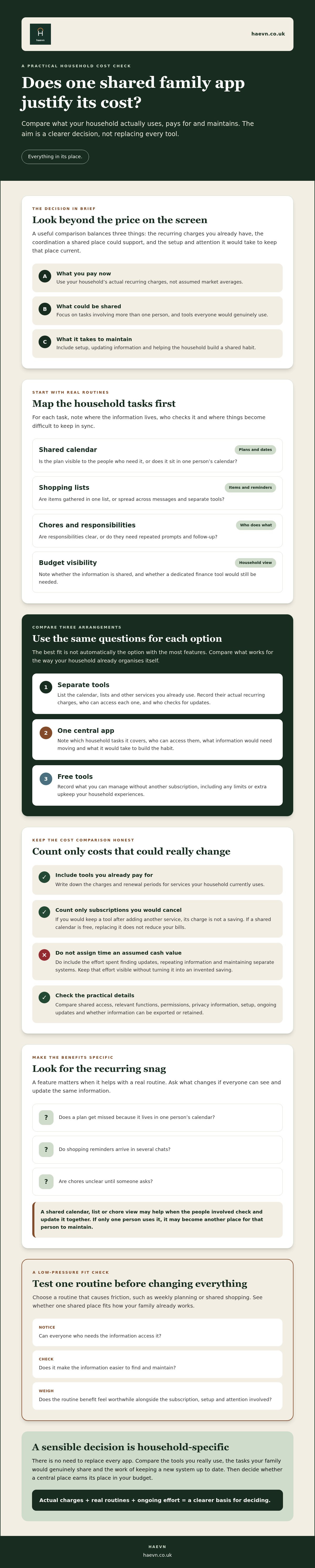
How to test whether a paid family app fits your household
Before subscribing, run a small household audit. The aim is to find out whether a shared app would address a real, recurring problem, not to persuade everyone to adopt another system. A short trial of one routine can reveal more than a long list of features.
A simple family value check
Start with the snags that lead to repeated messages or duplicated effort. Then agree who would keep shared information up to date and how often you’d review it. Use these prompts:
- Tasks: Which household jobs or plans regularly cause confusion, repeated reminders or crossed wires?
- Current tools: Which calendars, lists or subscriptions do you already use, and which would you genuinely stop paying for?
- Shared upkeep: Who will add updates, and when will the household check whether the information is current?
- Access: Who needs to see or manage each type of information, and can the app accommodate that?
Pick one routine to test, such as weekly planning or shared shopping. Agree what useful participation looks like: perhaps the people involved check the plan before the week starts, or add items to a list as they run out. Keep the measure simple and observable. Did the routine fit how your household already communicates, or did it create more reminders and maintenance?
Set a review point after you’ve used the app for a few cycles. Ask who actually used it, what still happens elsewhere, whether it duplicated a paid tool you can now cancel, and whether the household wants to continue. That gives you a grounded answer when justifying cost of family management app subscriptions.
What if free tools already work?
Keep them. A free shared calendar or list is a perfectly reasonable choice if it meets your family’s needs without adding unwanted admin. Paying makes sense only if shared access or combined functions address a problem your current arrangement leaves unresolved. Don’t count a subscription as valuable just because it contains features you don’t expect to use.
Make the decision reversible. Check the billing and cancellation terms before signing up, and decide what you’ll do with any information you want to keep if you leave. If a free trial is available, use it to test the chosen routine rather than trying to populate every feature at once. If the audit points towards trying a shared household app, you can start a 30-day trial with no card required, then review the fit before deciding whether to continue.
How Haevn helps with this
For households looking to bring several routines together, Haevn is a family hub app with tools for shared planning, household information and everyday coordination. You can focus on the parts your family would actually use rather than treating every feature as essential.
The Hub gives an overview of the family’s day. The Plan is a shared family calendar, and The List brings together shared shopping, chores and routine lists. Chores helps with assigning and tracking household tasks, while Family Chat provides a private place for household conversations. Milestones is a private family timeline for key moments.
The House brings together smart-home information, warranties and bills. The Pot is a family budgeting tool. Meal Planner supports weekly planning with diet and allergen filters, plus “Use It Up” suggestions to help reduce food waste. These features may not replace every tool your household uses, so compare them with the routines you identified. Explore the shared family app features and see which match your needs.
What is included in one household subscription?
Haevn’s Monthly and Annual plans cover up to eight family members, with the same features on either billing cycle. There are no tiers, individual plans or free version. The Monthly Plan costs £6.99 a month. The Annual Plan is £69.99 a year at the standard price, with a limited-time offer of £49.99 for the first year. 24/7 support is included with every plan.
That doesn’t mean every household needs to use every tool. The value depends on whether the people involved will use the features that address their coordination needs. When justifying cost of family management app subscriptions, compare the routines this supports with the tools and effort you’d keep otherwise.
How can a family try it before deciding?
Haevn offers a 30-day free trial with no card required. There’s no need to move everything at once: try one routine, such as shared planning or shopping, and review whether the household finds it useful before deciding what to do next.
Start your 30-day free trial, no card required.
Choose the setup your household will use
A family app earns its place when it supports routines people already need to share. Compare its subscription with the tools you’d genuinely stop paying for, then consider the setup and upkeep it asks of the household. If free tools already work, there’s no need to change them. If repeated updates or scattered plans cause regular friction, testing one routine can help you decide.
That’s a practical way of justifying cost of family management app subscriptions: judge the fit by real household habits, not a feature count. Haevn’s subscription covers up to eight family members, and 24/7 support is included with every plan. A 30-day free trial requires no card, giving your household time to see whether a shared app suits the way you organise family life.
Start your 30-day free trial, no card required.
Take it one shared routine at a time. Your family can decide together what belongs in one place.
Frequently Asked Questions
Is a family management app worth paying for if we already use a shared calendar?
Possibly, but only if it helps with needs your calendar doesn’t cover. A shared calendar may already work well for appointments and plans. Look at whether shopping lists, chores or household information still live in separate places, and whether that causes repeated updates or confusion. If your current setup suits everyone and doesn’t create unwanted admin, there may be no reason to add a paid app.
Can one family app replace separate calendar, budget and shopping-list apps?
It may bring some of those tasks together, but don’t assume it replaces every tool. Check that the app covers the functions your household relies on, and whether everyone can access and maintain the shared information. For example, The Pot is a family budgeting tool. Keep any separate app that still serves a need the family app doesn’t meet.
How can I compare the cost of a family app with separate subscriptions?
List the tools your household currently uses, their actual recurring charges in pounds and what each one does. Include free tools and services already included in another subscription. Then mark only the paid services you’d genuinely cancel if you switched. This gives you a grounded basis for justifying cost of family management app subscriptions, without counting hypothetical savings or ignoring setup and upkeep.
What should a family management app include to justify its subscription?
Look for tools that address your household’s recurring coordination needs, such as a shared calendar, lists, chores or budget visibility. Shared access matters only if the people involved can understand the app and will check or update it. Review who can see household information, the provider’s privacy details and billing terms. A long feature list alone isn’t a good reason to pay.
Can my family try Haevn before choosing monthly or annual billing?
Yes. Haevn offers a 30-day free trial, and no card is required. The same features are available with monthly billing at £6.99 a month or annual billing at £69.99 a year at the standard price. The trial gives your household a chance to see whether the shared tools suit your routines before deciding whether to continue and which billing cycle fits.