How to store important family documents online with a family task manager app in the UK
What if the quickest way to find your boiler warranty was to know which household task it belongs to? The bill may be in one inbox, the manual on an old phone and the warranty in a paper folder. A family task manager app UK households use can help bring useful records closer to the plans and tasks they support.
Online storage alone isn’t enough if nobody knows where the current file lives. This guide covers a simple way to gather, organise and review household documents, choose a suitable shared system and keep sensitive records in mind, without turning document storage into another ongoing project.
Key Takeaways
- Start with a small set of current household records, then gather, sort, label and review them.
- Choose a storage approach that makes documents easy to find alongside the household plans and tasks they support.
- A family task manager app UK households use can bring shared household information closer to the admin it relates to.
- Review records regularly and share each document only with the people who need it.
Why storing important family documents online needs a household system
A bill arrives by email, the appliance manual is saved on one phone and the warranty is in a paper folder. When someone needs the current details, the question is familiar: where did we put them? Moving files online can help, but a collection of uploads is still hard to use if nobody knows what each file is or where to look.
Online household document organisation means keeping useful records in a shared, structured system, with clear labels and a predictable place for each type of information. Storage holds the files. Organisation helps people find and use them. That distinction matters when a repair, renewal or household job depends on having the right record to hand.
Which family documents are useful to organise first?
Begin with records that support routine home administration: household bills, appliance manuals, warranties and contractor details. These can help someone check a service, find product instructions or locate information about previous work without searching through several inboxes.
Keep the first collection practical. You don’t need to upload every document the household has ever received. Personal identity details, financial records and other highly sensitive information deserve particular care. Keep them separate unless the system you choose suits the sensitivity of those records and the people who need access to them.
What makes a shared digital filing system useful?
Consistency is more useful than a complicated folder tree. Choose a small set of clear categories, then use familiar labels that explain what a file is, such as “boiler manual” or “electricity bill”. Where there are several versions, make the current one easy to distinguish, and remove outdated copies when they’re no longer needed.
A Document management system is built around organising and managing documents, rather than simply holding files. For a household, the useful principle is straightforward: records should have a clear home and make sense to the people who share them.
Shared access should reflect real responsibilities. Someone who handles a repair may need the appliance manual and contractor details; another person may need to check a bill. A family task manager app UK households choose for shared organisation can be useful when records sit alongside related household admin, rather than in another disconnected space.
Keep the aim modest: make the right household information easier to find, for the people who need it. A small, well-labelled collection is a better starting point than uploading everything indiscriminately.
How to store important family documents online in four manageable steps
Keep the first round small. Choose current records you already need for household admin, rather than trying to scan years of paperwork in one sitting. A manageable system is easier to maintain and easier for other family members to understand.
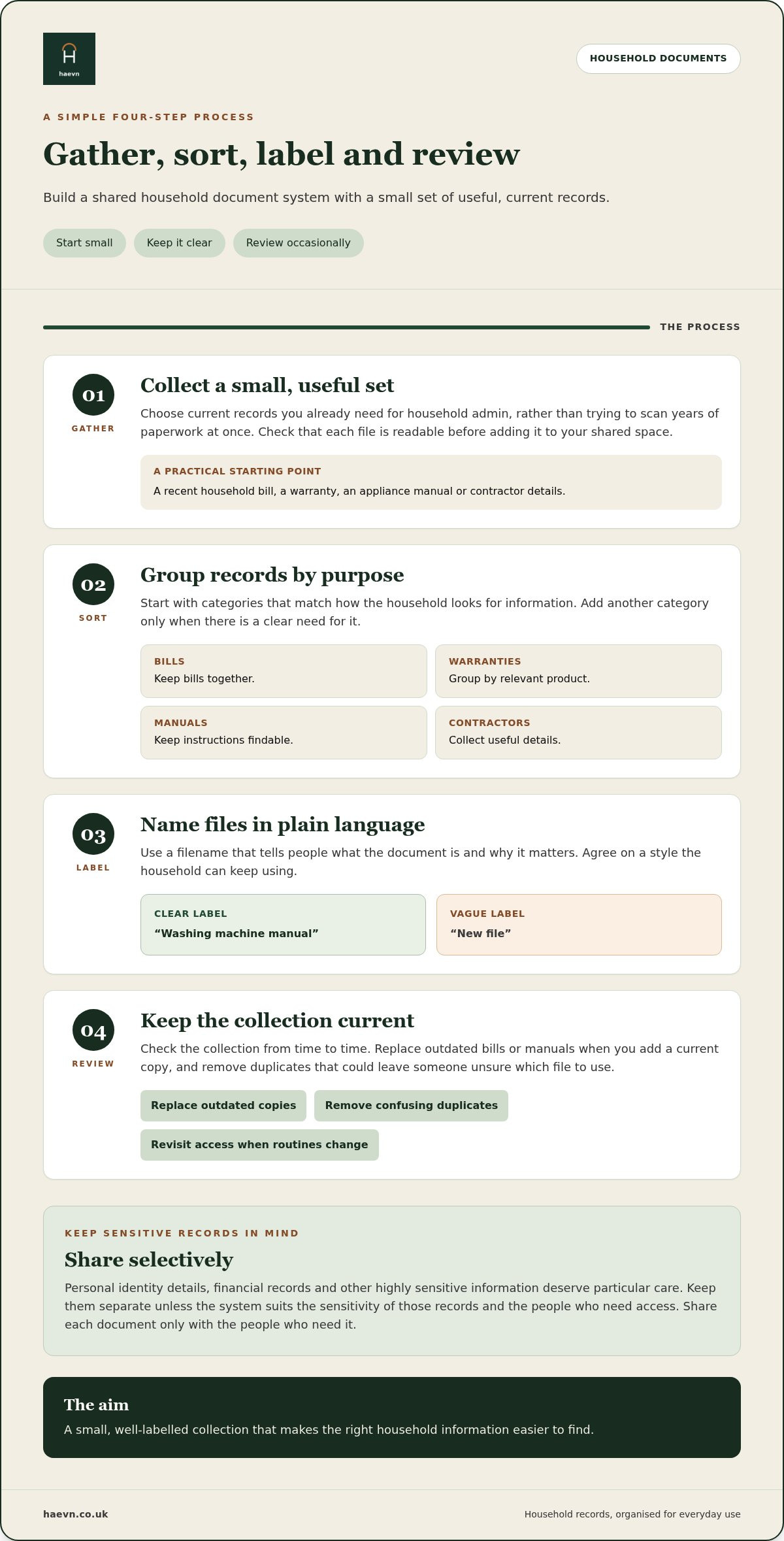
Gather, sort, label and review is a simple four-step process for organising household documents online.
- 1. Gather: Collect a small set of useful, current records, such as a recent household bill, a warranty, an appliance manual or contractor details. Check that each file is readable before adding it to your chosen shared space.
- 2. Sort: Group records by practical purpose. Start with categories such as bills, warranties, manuals and contractors, then add another only when the household has a clear need for it. A structure that reflects how you look for information is more useful than an elaborate filing system.
- 3. Label: Give each file a plain-language name that tells people what it is and why it matters to the household. “Washing machine manual” is clearer than “new file”. There’s no single naming format every family needs to follow; consistency within your own system is what helps.
- 4. Review: Check the collection from time to time. Replace outdated bills or manuals when you add a current copy, and remove duplicates that could leave someone unsure which file to use.
How should you sort and name household records?
Use categories that match real household tasks. For example, keep a bill with other bills and an appliance warranty with its relevant product information. If a filename needs more detail, add a useful description rather than relying on a date or vague label alone. Agree on a style the household can keep using.
How can family members find the right document?
Decide who needs access to each type of record, based on who handles that part of household life. A shared home for documents gives those people a common place to look, reducing repeated searches through inboxes and messages asking for a copy. If routines or responsibilities change, revisit the labels and access arrangements so they still make sense.
Be selective with personal information. The Information Commissioner’s Office offers guidance on data security and the security principle. Share only records relevant to the people who need them, and take care with sensitive files.
If you’re looking for a shared space to begin organising household records, you can set up a household admin space.
How to compare online document storage with a family task manager app
The right option depends on what happens after a document is saved. If you only need a place for a handful of files, a shared folder may be enough. If people need to connect a record to a repair, renewal or recurring household job, a wider family organiser may fit better. Compare the everyday use, not just the ability to upload a file.
| Option | Household context | Findability | Shared tasks | Ongoing upkeep |
|---|---|---|---|---|
| Standalone cloud folder | A simple place for a small set of household records. | Depends on clear folder names and file labels. | Tasks usually sit elsewhere. | Someone needs to keep folders and versions tidy. |
| App-based shared file space | Useful when household members need a shared place for files within an app. | Depends on how clearly files are grouped and named. | May keep some household information together, depending on the app. | Records still need checking and updating. |
| Wider family organiser | Suited to households managing documents alongside routine admin. | Records can be easier to locate in the context of related household activity. | Can bring documents closer to shared plans, lists and to-dos. | Document checks can form part of existing household admin. |
When is a shared folder enough?
A shared folder can suit a household with only a few records and a straightforward way of sharing them. It keeps the setup simple, but it doesn’t organise itself. Agree where each document belongs, use descriptive names and decide who will replace outdated copies. Without that small routine, a folder can become another place to search.
When does a family organiser fit household documents better?
Choose a broader organiser if a document often prompts a task or plan. A warranty may be useful alongside a reminder to check cover; contractor details may be relevant to arranging a repair. A family task manager app UK households use for shared admin can bring these related pieces of information closer together, rather than leaving files, to-dos and dates in separate places.
A shared calendar tool such as Google Calendar can help people coordinate dates, while a family organiser can connect a wider range of household activity. The important question is whether the system matches how your family handles admin, and whether its upkeep feels manageable. For more on assessing the wider options, read this guide to choosing a digital solution for family admin.
How to keep shared family documents current, findable and appropriately private
A shared filing system needs a little upkeep to stay useful. Outdated bills, duplicate manuals and unclear versions can make a tidy space confusing again. Keep the routine brief and link it to household admin you already do, rather than creating another chore to remember.
How often should household records be reviewed?
There’s no single review schedule that suits every household. Tie a quick check to a familiar routine, such as sorting bills or planning home maintenance. When you replace a record, make the current copy easy to identify and remove duplicates that could cause uncertainty.
For example, if you add a new appliance manual, check that the old one still relates to something in the home. If a bill has been superseded, decide whether the previous copy still serves a household purpose before keeping it. The aim is a useful current collection, not a perfect archive.
Labels should keep pace with family life, too. If someone takes on a new household responsibility, make sure the relevant records are easy for them to locate. A family task manager app UK households use for shared admin is most helpful when its information reflects who does what.
What should stay outside a shared household space?
Pause before adding personal identity details, financial information or other sensitive records. Consider what the document contains, who genuinely needs access and whether a shared household organiser is suitable for it. A general household filing space isn’t a replacement for specialist storage or advice where a document calls for different handling.
Share with purpose. A person arranging a home repair may need relevant manuals or contractor details, but that doesn’t mean they need access to every personal file. Keep the shared collection focused on household administration, and review who can access it as responsibilities change.
Keep the system focused on practical household records. Consider the sensitivity of each document before adding it, and keep personal material separate when that better suits your household.
A family system works best when it’s clear, current and limited to information people need. Set up a shared household space for the records and admin your family manages together.
How Haevn helps with this
Household records make the most sense when they sit within the wider admin they support. The House provides a place to organise household documents, bills, warranties, manuals and contractor details, so family members have a shared point of reference for practical home information.
That can be useful when a document relates to something the household needs to do. A manual may help with a home maintenance task; contractor details may be handy when arranging work. The record and the task remain part of your household organisation, without assuming that one automatically creates or updates the other. See how the household documents and bills feature fits into the app.
Where The House fits into family admin
The House focuses on household information, rather than serving as a specialist document-management service for every kind of personal record. It doesn’t control smart-home devices or replace services designed for sensitive or specialist documents. Keep your shared collection relevant to everyday household administration, and consider carefully before adding personal material.
As a family task manager app UK households can use for shared organisation, the wider value is having practical records alongside other parts of family admin. The House is one part of that system, not a reason to move every file into a new place. Choose a few records that family members regularly need and build from there.
How to begin without creating more admin
Start with a small, current set of household documents. Use clear labels, agree who needs access and add other records only when there’s a practical reason. A short review tied to an existing household routine can help keep the collection useful without turning document management into another large project.
The List supports shared to-dos, so a household job can be noted there. The Plan provides a shared calendar for dates and plans. These features can sit alongside the records in The House, helping family members coordinate related admin without promising automatic links or document workflows.
The aim is a straightforward shared routine: keep useful records in a consistent place, make related responsibilities visible and review information as household needs change. That way, the system supports daily life instead of creating another pile of digital admin.
Start your free trial. 14 days free, no card required.
Make household information easier to find
A useful online filing system doesn’t need to hold every family document. Start with current household records, give them clear names and review them alongside the admin you already do. Share only what the people responsible for household tasks need.
A family task manager app UK households use can bring records closer to shared plans and to-dos. The House organises household documents, bills, warranties, manuals and contractor details. The Circle supports up to eight family members, so household information can be shared with the people who need it.
Begin with a few useful files, then add more when there’s a practical reason. You can explore the setup without a card during the 14-day free trial.
Start your free trial. 14 days free, no card required.
A small, consistent system is a good place to start. Add to it at a pace that suits your household.
Frequently asked questions
How do I store important family documents online?
Choose a shared online space, then add a small set of current household records. Group files by purpose, such as bills, warranties, manuals and contractor details, and give each a clear name so family members know what it contains. Agree who needs access and review the collection occasionally to remove duplicates or replace outdated copies. Keep highly sensitive personal records separate unless the chosen system suits them.
Which family documents should I keep digitally?
Start with records that help with everyday household administration, such as utility bills, appliance manuals, warranties and contractor details. These are useful when checking a bill, arranging home maintenance or looking up product information. Focus on documents the household may need to find, rather than scanning everything. Consider the sensitivity of personal identity or financial records before storing them in a shared space.
Is it better to use cloud storage or a family organiser app?
It depends on how your household uses its records. A cloud folder can suit a small collection of files, provided everyone follows clear naming and upkeep habits. A family organiser may be a better fit when documents relate to shared plans, to-dos or recurring admin. Compare how easily family members can find information and keep it current, not just whether a tool can hold files.
How can I share family documents without losing track of updates?
Keep one agreed shared copy of each current record, use descriptive file names and replace outdated versions rather than saving several files with unclear labels. Decide who is responsible for updating each category, then review records during a familiar household admin routine. Share only with the people who need access. These simple habits make it easier for everyone to find the right version without repeated messages.
Can a family task manager app store household documents?
Some family task manager apps include a place for household records alongside shared planning and to-dos. This can be useful for bills, warranties, manuals and contractor details that relate to everyday home administration. Check that the app’s purpose and access arrangements suit the documents you plan to share. Keep sensitive personal files separate when appropriate, and don’t assume a household organiser replaces specialist document services.