Family chore app UK: choose a system that fits your household
When jobs live in chats, scraps of paper and separate lists, it can be hard to see who’s doing what. If one person has to assign every task and remind everyone else, the system can become another chore. A family chore app UK households can keep using should make responsibilities visible without turning every tidy-up into a points game.
More features don’t always make chores easier. Rewards, streaks and constant notifications may suit some families and feel like extra fuss to others. Start with a shared view of the jobs, who owns them and how often they need doing.
This guide covers what to look for when comparing options, from task assignment to how chores fit alongside calendars and shared lists. It also offers a simple way to build a routine around your household’s existing habits, without relying on repeated reminders or rewards.
Key Takeaways
- Choose a family chore app UK households can use to see who owns each task and whether it’s been done.
- Compare chore apps with shared calendars, lists and paper charts by how clearly they show responsibilities and support regular routines.
- Decide whether points and rewards suit your household, or whether simple task assignment is enough.
- Start with a few recurring chores, agree who’s responsible and review the routine once it’s in use.
Why a family chore app can make household responsibilities easier to see
A household job might be mentioned over breakfast, added to a note on one person’s phone and then forgotten by everyone else. The difficulty isn’t always the task itself. It’s knowing whether someone has taken responsibility, or whether everyone assumes somebody else will.
A family chore app gives the household a shared place to assign and track chores. People can refer to the same view instead of relying on one person to remember every job and prompt the rest of the family. That makes responsibilities easier to see, but it can’t decide what feels fair or get everyone to agree. Those conversations still matter.
Chores aren’t only for parents to allocate to children. Adults may need to share cooking, cleaning, laundry, shopping or taking the bins out, alongside jobs children can take on. A family chore app UK households choose should reflect the people who contribute to the work, rather than assume one person manages it all.
What does a family chore app actually do?
Someone records a job, assigns responsibility and uses the shared view to check its status. The exact options vary by app, so check whether it supports the features your routine needs, such as recurring tasks or reminders.
A shared calendar is mainly for events and time-specific plans, such as an appointment or school meeting. A to-do list can hold jobs, but may not make ownership or progress as clear. A chore tracker puts household tasks and their status at the centre. If you only need to note “buy washing-up liquid”, a general list may be enough. If you need to see who’s responsible for cleaning the bathroom, a chore-focused view may suit better.
When could a shared chore app help?
It may help when several people contribute but have different schedules, or when jobs are discussed repeatedly without a clear handover. For example, if one person usually cooks and another handles the washing-up, recording those responsibilities makes the arrangement visible to both.
That visibility is useful only if everyone understands the plan. Agree what counts as done, who owns each job and how the household will handle changes. Otherwise, the app can become another place to check without resolving the uncertainty.
A paper list on the fridge or a regular conversation may work well if there are few chores and everyone remembers the routine. Choose the simplest system people will use. An app is worth considering when one shared, up-to-date view is easier than keeping the plan in people’s heads or scattered notes.
Which family chore app features make shared tasks easier to manage?
A useful app doesn’t need to turn housework into a project. Start with the basics: can everyone see what needs doing, who’s responsible and whether it’s complete? For a family chore app UK households can stick with, a clear shared view is often more useful than a long list of extras.
- Easy assignment: it’s clear who owns each task, rather than leaving the household to guess.
- Visible progress: people can see what’s still to do and what’s been marked complete.
- Suitable shared access: household members who need the chore plan can access it, with permissions that make sense for your family.
- A usable household view: tasks are easy to find without digging through unrelated information.
How should tasks be assigned and tracked?
Look for clear ownership. “Clean the kitchen” can mean different things to different people, so agree what the task involves before assigning it. Check that responsibility and progress are easy to understand at a glance.
Consider your routine, too. If the same jobs come round regularly, recurring tasks may help, but not every app offers them. A shared view can make the plan easier to refer to, rather than relying on one person to remember each job and tell everyone else.
Think about who needs to see or update the chore list, and whether the app gives you suitable ways to manage access. Household task information may be ordinary, but clear permissions and privacy information are still useful when comparing tools.
Do families need points, rewards or reminders?
No. Points, badges and rewards are optional ways to encourage participation, not the measure of a useful chore system. Some households may enjoy them; others may prefer a simple list of agreed responsibilities. Extra prompts can help some routines, but repeated notifications may feel like more noise than support.
Choose features your household will genuinely use. If you’re weighing up how to encourage children without constant reminders, read the guide on how to stop nagging kids to do chores for a separate set of practical ideas.
Keep the setup simple at first. You can try a shared chore view and see whether clear ownership and progress suit your household before adding more to the routine.
How to compare a family chore app with calendars, lists and chore charts
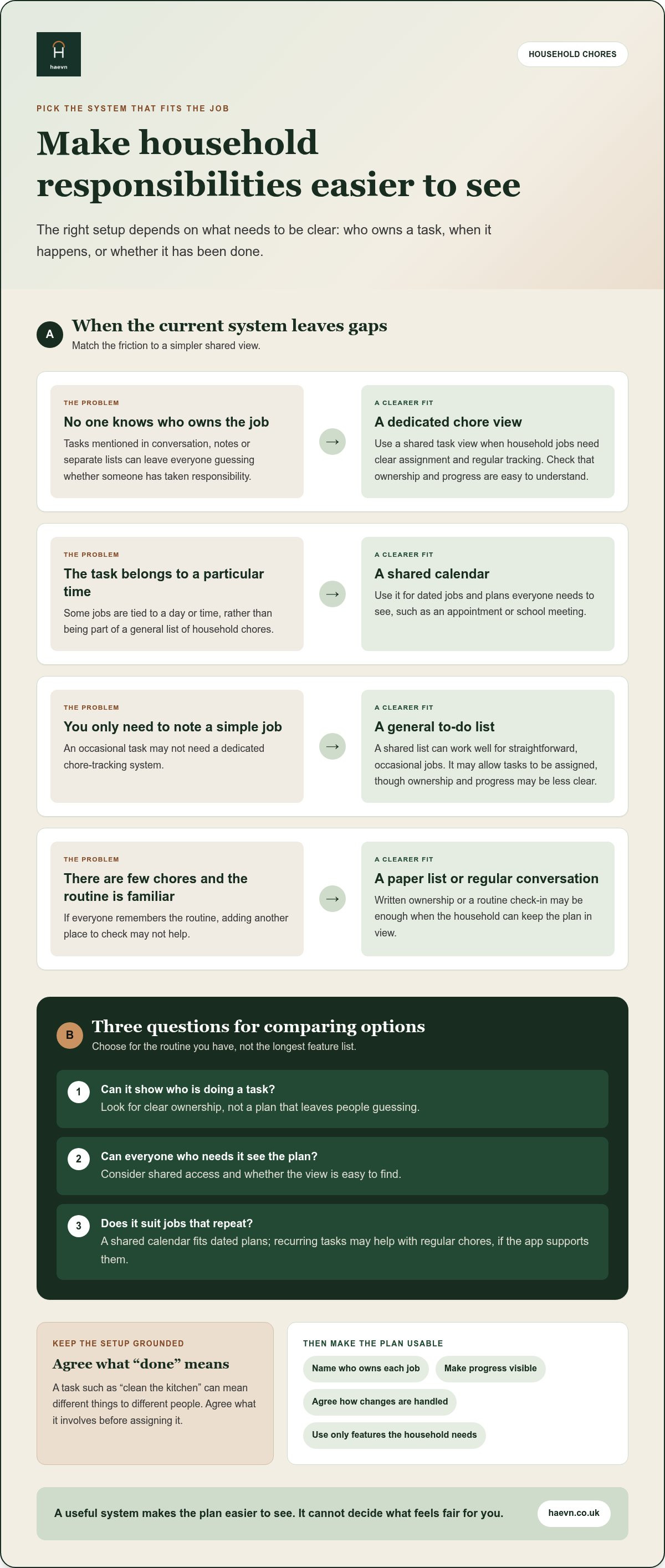
Another app only helps if it makes the routine simpler. Compare each option by asking three practical questions: can it show who’s doing a task, can everyone see the plan, and does it suit jobs that repeat? A family chore app UK households choose doesn’t have to replace every calendar or list. It should have a clear purpose in your system.
| Option | Task assignment | Shared visibility | Routine suitability |
|---|---|---|---|
| Dedicated chore app | Often focused on assigning household jobs | Shared task view, depending on the app | Useful when chores need regular tracking |
| Shared calendar | Can show who is doing a dated job | Good for plans everyone needs to see | Fits chores linked to a particular day or time |
| General to-do list | May allow tasks to be assigned | Useful for a shared set of simple jobs | Works well for straightforward, occasional tasks |
| Paper chart | Written ownership can be clear | Visible where the chart is displayed | Suits households that prefer an offline routine |
When is a dedicated chore app more suitable than a shared calendar?
A calendar is built around dates and events. Google Calendar, for example, can show that the recycling needs to go out on a particular evening or that a one-off job is planned for Saturday. But a calendar event may not make it easy to follow a task’s progress or keep a broader list of household responsibilities in view.
A chore app may suit a routine where the main question is “who’s doing this, and is it done?” If the household only has occasional jobs tied to specific dates, a shared calendar may be enough. Neither tool suits every family.
When could a list or paper chart be enough?
A short list can work well for a small number of simple jobs. A paper chart may suit a household that prefers an offline view everyone can see at home. Keep it somewhere visible and agree who updates it.
Move to an app only if shared access or progress tracking would make the routine easier to manage. Avoid entering the same job in several places. Pick one main view, keep the steps to a minimum and review whether it’s helping. The right system is one your household can maintain without creating more admin.
How to set up a family chore app around a routine you can keep
Start with your household’s actual routine, not an idealised list of everything that could be done. A family chore app UK households can keep using should reflect who has time for which jobs and how tasks fit around work, school and other commitments.
- List the regular tasks. Note jobs that need attention daily or weekly, such as preparing meals, laundry or putting the bins out. Leave occasional tasks aside for now.
- Agree who owns each job. Make responsibility clear, including how someone can hand a task over if plans change.
- Choose one shared view. Add the agreed chores to the app and decide how everyone will check progress.
- Review the routine. Try it, then talk about what’s working and adjust the plan together.
What should the family agree before adding chores?
Decide which jobs need to be visible to everyone, who takes responsibility and what “done” means. For example, agree whether clearing the kitchen means putting dishes away as well as wiping the worktop. Set realistic expectations around the time people have available. A fair division doesn’t have to mean identical tasks. It means making the work and ownership clear. This guide to sharing household responsibilities fairly can help you start that conversation.
It’s also useful to agree what happens when a task is missed. Is it carried over, picked up by someone else or discussed at the next check-in? A shared understanding is more practical than treating a missed job as a personal failing.
How can the household review whether the system works?
Once the routine has had a proper try, have a brief check-in. Ask whether tasks are clear, whether the workload feels manageable and whether anyone is still doing most of the remembering. Remove unnecessary steps or chores that no longer need tracking. The aim is a shared record that supports conversation, not a substitute for it.
Keep the first setup modest. Add a few regular jobs, see how they fit, then adjust before expanding the list. If you’re ready to put agreed chores in one shared place, set up a shared chore routine.
How Haevn helps with this
Chores supports assigning and tracking household chores. It sits alongside other shared household tools, so tasks can be part of a wider routine rather than managed in a separate system.
How do Chores and The List fit into family organisation?
Chores is for assigning and tracking household jobs. The List is for shared shopping and to-dos. For example, cleaning the bathroom belongs with chores, whilst adding washing-up liquid to the shopping list belongs in The List. Keeping those purposes distinct can make the right information easier to find.
Having related household tools together may suit families who want one shared place to organise everyday tasks. Read more about The List for shared shopping and to-dos.
The app focuses on household organisation.
What can families expect before getting started?
One subscription supports up to eight family members. The free trial lasts 14 days and requires no card. Start with a few agreed chores, assign responsibility and use the shared view to track progress. The app gives the household a place to coordinate tasks. Your family decides how to divide the work and handle changes.
If a shared view suits your routine, Start your free trial. 14 days free, no card required.
Choose a routine your household can keep
The right family chore app UK households choose should make responsibilities easier to see, not add more admin. Compare clear task ownership and progress with a shared calendar, a list or a paper chart. Choose the format your household will use.
Start small. Agree which jobs need tracking, who’s responsible and what counts as finished. Review the routine together and adjust anything that feels unclear or hard to maintain. An app can keep the plan visible, but a fair arrangement still starts with a household conversation.
Chores supports assigning and tracking household chores, with one subscription supporting up to eight family members.
Frequently asked questions
Is a family chore app worth using?
It can help if household tasks are hard to see, assign or track together. First identify the problem: are jobs scattered across messages, or is ownership unclear? Then compare an app with a calendar, paper chart or simple list. If one person still has to maintain and explain the system, it may add administration rather than help.
Can a family chore app help children take responsibility?
It can make assigned tasks and their status easier to see, but it doesn’t decide which chores are suitable or replace adult judgement and conversation. Agree expectations as a household and choose jobs that fit each person. Points and rewards are optional. Clear responsibilities may be enough.
What features should I look for in a family chore app?
Start with clear task assignment, a shared view and a simple way to track progress. Recurring tasks, permissions or filters may matter to your routine, but not every extra is essential. Choose a system your household can use without adding more administration.
Are chore apps better than a shared calendar?
They serve different purposes. A calendar is useful for events and jobs tied to dates, while a chore app focuses on assigning and tracking household tasks. A simple list or paper chart may also suit your household. Choose the format that makes the right information easiest to see.
Can a family chore app work for adults as well as children?
Yes. Chores can be shared among adults, children and other family members, depending on the household. Focus on agreed responsibilities rather than treating the app as a parent-to-child system. Choose a shared view that makes ownership clear and suits everyone’s routine.
How many family members can use Haevn?
Up to eight family members can use it under one subscription. Chores supports assigning and tracking household chores, while The List is for shared shopping and to-dos. The 14-day free trial requires no card.