Chore apps for ADHD families: how to choose a helpful fit
What if a chore app could make household tasks easier to see without adding pressure? For ADHD families, the right tool should fit the way your household works, not demand a perfect routine.
When tasks are forgotten or hard to begin, another set of reminders may not help. A shared system can offer a clearer starting point, provided it feels manageable for everyone.
This guide looks at what to compare, how to set up a simple routine and how to choose a chore app for adhd families that your household can adapt over time.
Key Takeaways
- Look for a chore app for adhd families that makes tasks, ownership and progress easy to see without piling on reminders.
- Compare recurring tasks, flexible timing and shared access against the routines your household already has.
- Choose a tool that suits your needs: a dedicated chore app, shared calendar or broader family organisation hub.
- Start with a few familiar chores, write each as a clear action and agree who will take responsibility.
- Review the setup together and adjust it if it feels hard to keep up with. The system should support your family, not add pressure.
Why a chore app for ADHD families needs to reduce friction
The recycling needs to go out before collection. Everyone knows that, but the bag is still by the door because nobody has decided who will take it, or when. The sticking point isn’t always knowing a chore exists. Sometimes it’s working out the next step.
A chore app for adhd families is best understood as a shared place to make tasks visible, organise responsibilities and show what’s been done. It can support a household routine, but it doesn’t treat ADHD or replace individual support. A chore app can organise tasks around ADHD; it cannot change ADHD or a person’s executive function.
Why remembering and starting can feel different
Executive function is a broad term for the mental skills that help us manage actions, such as remembering what we meant to do, deciding what matters first and getting started. These steps can be connected, but they aren’t identical. Someone might remember the washing needs doing and still feel unsure whether to gather clothes, check the machine or find the detergent first.
ADHD affects people in different ways. An overview of ADHD and its common symptoms offers general context, but it can’t tell a family which routine or screen will suit a particular person. A detailed schedule may help one household and feel like too much to another. The useful test is whether the system makes the next action clearer for the people using it.
What a chore app can realistically support
A shared task list can act as an external reminder: the job is written down instead of relying on someone to keep it in mind. Naming an owner also answers a practical question before it becomes a disagreement: who is taking care of this? A clear status, such as not started or done, can help the family see where things stand without repeatedly asking.
That’s support, not a promise. An app can’t make chores enjoyable, decide what’s fair for your household or promise that a task gets finished. If checking a list feels like another demand, the setup may need changing. Try fewer tasks, simpler wording or a different way of reviewing responsibilities.
Choose around the family’s existing habits. If people already check a shared screen at breakfast, that may be a better place to make chores visible than a system that depends on everyone opening a separate app at set times. For households juggling work and home routines, a shared view of family responsibilities can help bring tasks into the same everyday picture.
The aim isn’t to make family members adapt to software. It’s to find a format they can actually use, then adjust it when routines or needs change. A helpful app should make the next step easier to spot, not add another standard everyone has to meet.
Which chore app features can help with executive dysfunction?
A useful feature isn’t automatically useful for your family. Look for clear task names, visible ownership and a reminder level people can live with. Recurring chores can help with jobs that repeat, such as putting the bins out, but fixed schedules may not suit a routine that changes from week to week. Flexible timing and simple progress markers can make it easier to see what’s due and what’s already been done.
The most useful features are the ones your family can maintain on an ordinary week. A chore app for adhd families should make the routine easier to follow, not ask everyone to learn a complicated new system.
Task breakdowns, reminders and visual cues
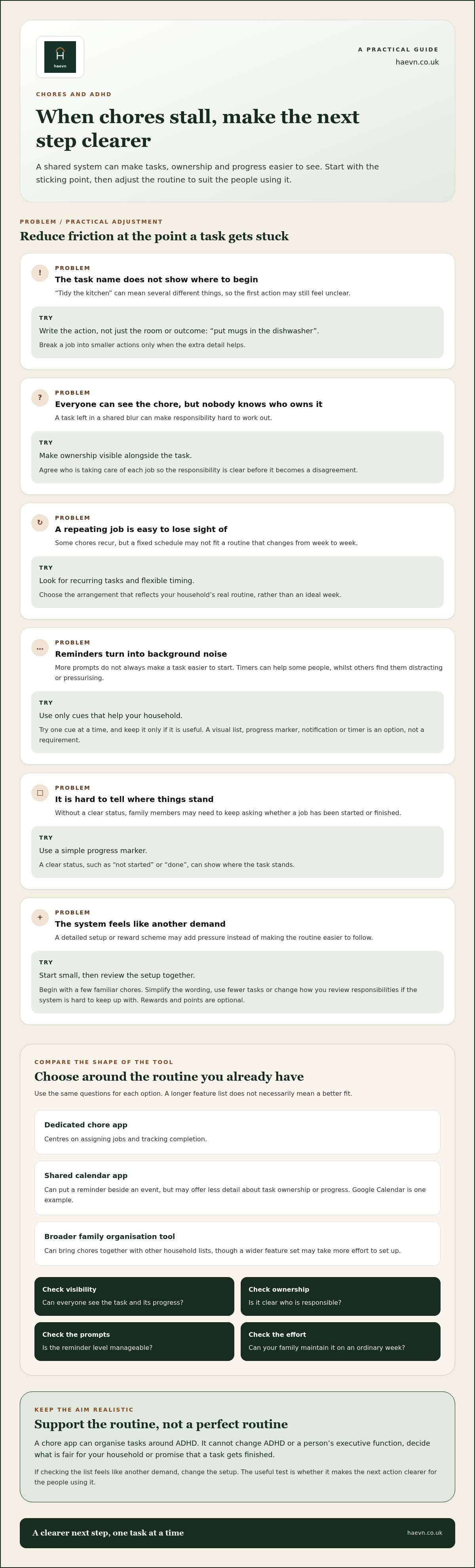
Broad labels can leave the first step unclear. “Tidy the kitchen” might mean putting mugs in the dishwasher, wiping the worktop or clearing the table. A more specific task name, such as “put mugs in the dishwasher”, gives someone a clearer place to begin. Break a job into smaller actions only when that extra detail helps. For some people, several steps on screen may feel like one more list to manage.
Visual lists and progress markers keep information in view; notifications can bring attention back to a task. Timers may help some people get a sense of how long a job will take, while others find them distracting or pressurising. These are options, not requirements. Try one cue at a time, then keep it only if it helps in your household.
- Clear labels: describe the action, not just the room or outcome.
- Visible ownership: show who is responsible, so jobs aren’t left in a shared blur.
- Manageable reminders: use enough prompts to be useful, without letting them become background noise.
Rewards, points and gamification
Quests, points or rewards may appeal to some children and families. Others may prefer a straightforward list, or find that scoring chores makes everyday responsibilities feel like a contest. There’s no single approach that suits everyone, and a reward system isn’t a requirement for an ADHD-supportive routine.
Keep the basics separate from the extras. The core job is to make the task, owner and progress clear. If your family chooses to add incentives, agree what they mean and review whether they still feel fair. An app can offer a structure, but it can’t promise motivation, a change in behaviour or an ADHD outcome.
Compare features against a typical day, not an ideal one. If you want to test whether a shared task space fits your routine, explore a family hub for household tasks and consider which parts feel straightforward to keep using.
How to compare chore apps for an ADHD household
Compare tools against the routine you have, not a perfect week. A dedicated chore app may centre on assigning jobs and tracking completion. A shared calendar app, such as Google Calendar, can put a reminder beside an event, but may offer less detail about task ownership or progress. A broader family organisation tool can bring chores together with other household lists, though a wider feature set may take more effort to set up.
Use the same questions for each option. This makes it easier to see whether a tool fits your family, rather than choosing by the longest feature list.
Visibility: Dedicated chore tracking can keep jobs and completion status together. Calendar reminders make tasks visible at a particular time, whilst shared to-do lists show outstanding jobs without necessarily placing them on a schedule.
Flexibility: Check whether you can change an assignment or timing when plans shift. Calendar-based systems can suit time-specific chores; a task list may feel more adaptable when the day is less predictable.
Reminders: Consider whether prompts can be adjusted to suit your household. Calendar alerts can be useful for a job tied to a deadline, but a reminder for every task may become noise.
Shared access and privacy: Check who can view or edit tasks and whether access can be limited appropriately. Shared visibility should support coordination, not become a way to monitor family members.
Setup effort: A focused chore tool may be straightforward for household jobs, while a broader family hub can reduce separate places to check if your family already uses it for other shared information. Reward systems may add a playful layer, but can also mean extra rules and upkeep.
A simple feature-fit comparison
Think about what needs to be visible in one glance. If the main challenge is knowing who is doing which job, prioritise clear assignments and progress tracking. If remembering when a task is due is the sticking point, calendar reminders may be enough. If household information is already scattered across apps and notes, a broader tool may bring more into one shared place, provided it remains easy to use.
For a chore app for adhd families, access matters as much as features. Make sure the people responsible for tasks can see what they need, and keep shared information proportionate to the job. No reward system is essential: choose one only if it suits your family and doesn’t make routine chores harder to manage.
Questions to ask before choosing
- Can each family member understand the task and its next action at a glance?
- Can you adjust reminders or assignments when the week changes?
- Does it fit the way your household already shares information?
- Will it reduce the number of places people need to check?
- Can you keep access appropriate without relying on monitoring?
One useful test is to add a small set of ordinary household tasks and see whether everyone can find their responsibilities without extra explanation. If the system calls for lots of setup or frequent maintenance, it may be more tool than your routine needs. Pick the simplest option that makes the right information visible.
How to set up a chore app without creating more pressure
A new system is easier to try when it starts small. Don’t transfer every household job into the app in one sitting. Choose a familiar routine, agree what each task means, assign responsibility and decide how you’ll check progress. Then leave room to adjust.
Start with one routine and clear actions
Pick a routine that already happens regularly, such as tidying after a meal or getting ready for the next day. Add a few recurring chores from that routine rather than trying to map the whole household at once. A smaller list is easier to understand and gives you a clearer sense of whether the setup fits.
Write each task as an action with a recognisable finish point. Instead of “sort dinner”, try “put leftovers in a container and place it in the fridge”. Keep the wording and size appropriate to the person doing the job. One clear action may be enough; another task might need splitting into smaller steps. The aim is useful clarity, not a long instruction manual.
Next, agree who owns each task and how family members will check the list. Decide what “done” means for the household. For example, does setting the table mean putting out plates only, or cutlery and glasses too? A shared understanding can spare people from having to guess whether a job is complete.
- Choose one familiar routine and select a few jobs within it.
- Write each job as a clear action with an agreed finish point.
- Assign an owner and agree how everyone will see progress.
- Try the setup, then review what needs changing.
Review what is helping and what is not
Set aside a brief, regular moment to check how the system is working. Keep the discussion practical and free of blame. Are tasks easier to find, understand and begin? Are assignments still realistic? If a routine changes, update the tasks rather than treating the change as a failure.
Look for signs that the app is creating extra work. Duplicate alerts, repeated checking or steps no one uses are good reasons to simplify. Remove a reminder, shorten a task description or pause a chore that no longer fits. A chore app for adhd families should be something the household can adapt, not another standard to keep up with.
If reminders are becoming a stand-in for conversation, agree who checks the list and when, rather than adding more alerts. Keep the app as a shared reference point, while leaving room to talk through changes or ask for help.
When you’re ready to put a few shared tasks in one place, try a shared household task space and build from the routine your family already follows.
How Haevn helps with this
Haevn is a family hub, not an ADHD treatment. Its Chores feature supports assigning and tracking household tasks, giving family members a shared place to see responsibilities and progress. That can help make a routine easier to follow, but the app doesn’t treat ADHD or means that chores get done. It’s a practical place to organise household information, not a substitute for individual support.
A shared place for household tasks
Chores sits alongside The Hub, which provides a daily overview, and The List, which holds shared shopping and to-dos. Each has a different role: chores can be assigned and tracked, the overview can help everyone see the day, and shared to-dos can hold the smaller jobs that crop up along the way. A shared view of The List for shared family to-dos can help keep those tasks together rather than scattered across notes and separate lists.
This wider view may suit households looking for shared organisation for busy families, where chores are only one part of the routine. You can start with a few agreed tasks and see whether the setup feels clear to the people using it. Keep the actions specific, make ownership visible, and change the arrangement if it creates more checking or reminders than it saves.
A chore app for adhd families still needs to fit the people and habits in that home. Haevn offers shared organisation, not a prescribed ADHD routine. It doesn’t decide what each person should be able to do, replace family conversations or promise that a task will be completed. The useful question is whether having chores, daily information and shared to-dos in one family hub makes responsibilities easier for your household to see.
A low-pressure way to try the routine
There’s one plan, with access for up to eight family members and no per-member fee. The 14-day free trial doesn’t require a card. That gives your household a chance to try a small set of shared tasks and notice whether the setup works in everyday life. Keep what helps. Adjust or remove what doesn’t.
Start your free trial. 14 days free, no card required.
Choose a routine your family can grow with
The first version of your system doesn’t need to be the final one. Treat it as a starting point, not a test everyone has to pass. A useful chore app for adhd families should leave room for routines to change as energy, commitments and household needs shift.
Before adding more, notice what feels different in day-to-day life. Is it easier to agree who’s doing a task? Can family members make changes without one person carrying all the organising? Those answers matter more than having every feature switched on. If the setup starts to feel like another job to manage, simplify it. A quieter system can be more useful than a perfect-looking one.
Choose the next small step together. That might mean trying a shared task space, agreeing what you want it to help with, or deciding to keep your current routine as it is for now. There’s no need to turn household tasks into a performance. Progress can be as simple as making the next action clearer, then finding a way of working that feels fair to the people sharing it.
Start your free trial. 14 days free, no card required.
Frequently Asked Questions
Can a chore app help with ADHD or executive dysfunction?
It can support parts of a household routine, but it can’t treat ADHD. A chore app for adhd families may be useful if, for example, a task gets lost between school bags arriving home and dinner starting. Try placing that job where the family already checks shared information, then notice whether it’s easier to pick up. If the app creates extra work, change the setup rather than blaming anyone for not following it.
What features should an ADHD chore app have?
Choose features around a real sticking point, not a checklist of what an app can do. If tasks are forgotten between rooms, a shared view may help; if people aren’t sure whose turn it is, visible assignments matter more. You could test a recurring reminder for putting the bins out, then check whether it’s useful or simply another alert to dismiss. Keep only the features your family actually uses.
Are chore apps with rewards useful for children with ADHD?
They can suit some families, but rewards aren’t essential. Before adding points or prizes, consider whether they make the task clearer or add another negotiation about what counts. For instance, a family might agree that everyone’s shared evening jobs are simply part of the routine, without scoring them. If incentives cause arguments or make a child feel judged, remove them and return to a straightforward way to see responsibilities.
How can we stop a chore app becoming another source of stress?
Agree what the app is for, and what it isn’t. It might be the place to check who is taking the recycling out, while conversations still handle changes or requests for help. Avoid using a missed tick as proof that someone doesn’t care. At a family check-in, ask what made the task difficult and whether the arrangement needs adjusting. That keeps the focus on solving a practical problem together.
Can a family use one chore app across several members?
Yes, if the app supports shared household access and lets you manage who can see or change information. Before adding everyone, agree which tasks belong in the shared space and what each person needs to access. Keep permissions relevant to coordination, rather than using an app to monitor family members. A shared setup works best when it gives people the information they need without turning every household action into a report.