Avoiding parental burnout: a guide for families
When plans live in different calendars, reminders sit in one person’s head and the same decisions come round again, family life can feel like a second job. Avoiding parental burnout tools should make everyday responsibilities easier to see and share, not add another system to maintain.
A shared app or a new routine can help organise household tasks. But making work visible is not the same as sharing the thinking and responsibility behind it. The aim is a clearer picture of what needs doing, who is doing it and when, without building a more elaborate way to keep track.
This guide compares practical options for sharing household plans, lists and recurring tasks, alongside simple ways to cut down on repeated decisions. You’ll find ways to choose tools that fit your family, keep them manageable and recognise when organising support isn’t enough. Tools can help with coordination. If you’re struggling over time, talking to someone you trust or seeking professional support may also help.
Key Takeaways
- Compare paper lists, shared calendars, routines and digital organisers by what they organise and how much upkeep they need.
- Choose tools that give the right people access and make responsibilities easy to see and update.
- Start with one recurring pressure, agree who updates the tool, then review whether it saves effort.
- Consider privacy and maintenance as well as convenience, so a new system doesn’t become another household task.
- Shared organisers can support coordination, but they don’t replace shared responsibility or professional support when it’s needed.
What parental burnout tools can and cannot do
Family pressure rarely arrives as one neat task. It might be a calendar to update, a school message to remember, dinner to plan and the question of who is handling each job. Tools for managing that load include routines, shared information, practical help from other people and digital organisers. The useful option is the one that makes a real responsibility easier to see or share.
Parental burnout describes prolonged exhaustion associated with the demands of parenting, which may affect how a parent feels about their role and day-to-day family life. It isn’t a label to apply to yourself from a checklist. For a broad overview, see Parenting stress, also known as parental burnout. Organising can ease some daily pressure, but no calendar, list or routine can promise to help avoid burnout or address every cause.
A difficult week might follow illness, disrupted sleep or an unusually full schedule. If distress continues after a busy spell passes, or feels hard to manage, consider speaking with your GP or a qualified mental health professional. Practical organisation can sit alongside support, but it isn’t a substitute for it.
When everyday pressure starts to feel unmanageable
The mental work often happens between visible jobs: noticing that something needs doing, remembering when it’s due, planning around everyone’s commitments and checking that another person knows the plan. When those demands keep returning, it can feel as if you’re always on call. Every family’s circumstances differ, so this experience won’t look the same for everyone.
A tool can make a task clearer. It can’t, by itself, remove the reason the task exists, create more time or make another person take responsibility. A shared reminder may help with a school form, for example, but the family still needs to agree who completes and submits it.
Why adding another system can backfire
A new system takes work to set up. Someone must decide what belongs there, add the details and keep them current. If one person does all of that, the tool may organise the work without sharing it. Avoiding parental burnout tools means looking for less repeated effort, not simply collecting more apps.
Keep the arrangement small. Agree what the tool is for, who can update it and what happens when plans change. If information is duplicated across a notebook, messages and several calendars, choose one place for that type of task where practical. After trying it in an ordinary week, ask whether it saved time or added upkeep. Adjust or drop what isn’t helping. The aim is a clearer shared picture, not a perfect household system.
A roundup of tools for sharing the family workload
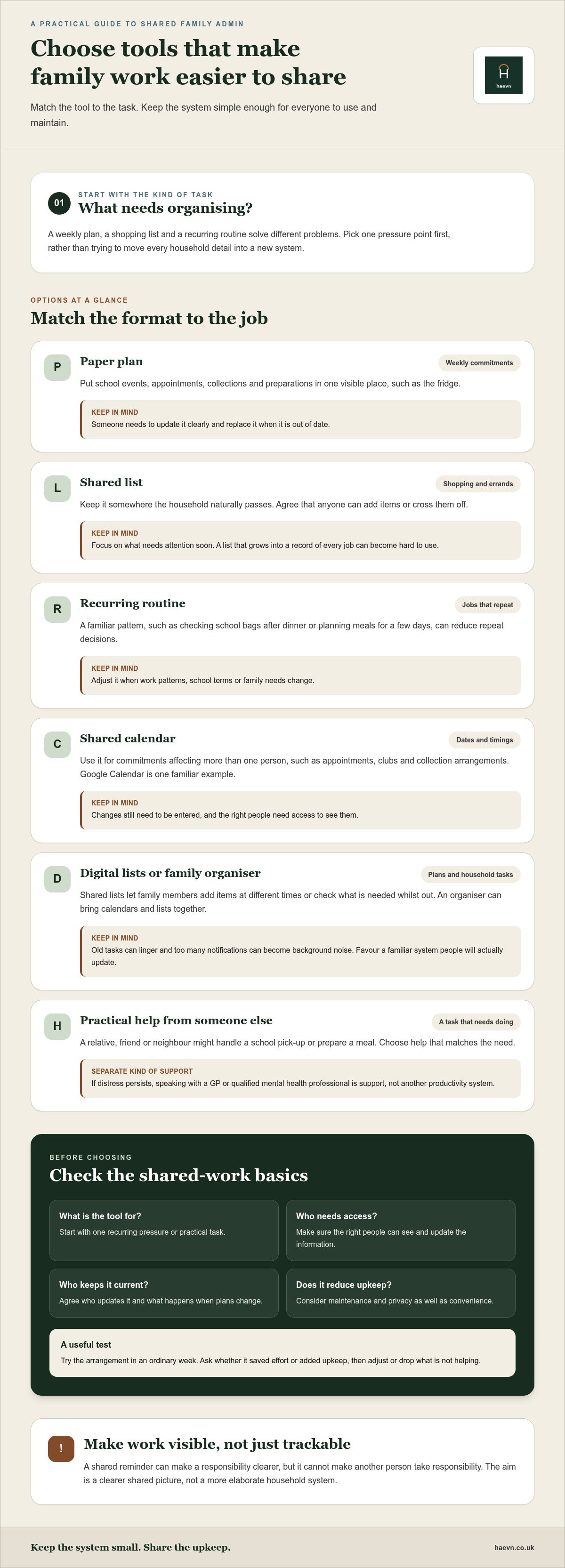
The right tool depends on the task and your family. A weekly plan may suit changing schedules, while a routine can take the thought out of jobs that happen in much the same way each time. Consider what needs organising, who needs to see it and how much effort it will take to keep it current.
Low-tech tools for reducing repeat decisions
A paper plan on the fridge can show the week’s main commitments at a glance: school events, appointments, who’s collecting and what needs preparing. It’s easy to see without opening a device. Someone still needs to update it clearly and replace it when it’s out of date.
A short shared list works well for shopping or errands. Keep it somewhere the household naturally passes, and agree that anyone can add to it or cross items off. A list that grows into a record of every job can become hard to use, so focus on what needs attention soon.
Simple recurring routines can reduce small decisions. You might check school bags after dinner or plan meals for a few familiar days. Once agreed, routines need little recording, though they may need adjusting when work patterns, school terms or family needs change. Low-tech options are easier to maintain when everyone sees and uses the same version.
Digital tools for shared plans and household tasks
A shared calendar is useful for dates and timings that affect more than one person, such as appointments, clubs and collection arrangements. Google Calendar is one familiar example. It can bring schedules together, but someone still needs to enter changes and make sure the right people can see them.
Shared digital lists suit shopping, household jobs and things to prepare. They’re handy when family members need to add items at different times or check a list whilst out. The trade-off is upkeep: old tasks can linger, and notifications can become background noise if there are too many. A family organiser can bring calendars and lists together, but only helps if it’s straightforward for the people expected to use it.
When comparing digital tools for family admin, look at shared access, ease of updating and whether the information you need can live in one place. A small, familiar system may serve your household better than one with features you won’t use.
Not every pressure is an organising problem. Practical help from a relative, friend or neighbour might mean someone else handles a school pick-up or prepares a meal. If distress persists, speaking with a GP or qualified mental health professional is a separate form of support, not another productivity system. Choose the kind of help that matches the need.
You can try a shared family organiser for household plans and tasks. Keep the set-up focused on a recurring need, and leave out features that would create extra work.
How to compare family tools without adding more admin
A tool is useful only if it makes a real task easier for the people involved. Compare options by asking who can access them, how updates happen, where information is visible, what privacy choices are involved and how much upkeep the system needs. A tool that looks capable on paper may still leave the person who already keeps track of everything doing the maintenance.
Shared ownership matters more than feature count: a simple tool everyone can use is often more helpful than a sophisticated one only one person maintains.
Paper plan
Useful for: Making key dates and jobs visible at home.
Possible drawback: Someone must keep it up to date, and people away from home may not see changes.
Shared calendar
Useful for: Showing appointments, activities and timings to the people involved.
Possible drawback: Dates need entering and updating, and access must be set up for the right people.
Shared list
Useful for: Keeping track of shopping, errands or household jobs.
Possible drawback: Items can become stale or hard to find if nobody clears or sorts them.
Recurring routine
Useful for: Making regular jobs more predictable without checking another system.
Possible drawback: It may need revisiting when circumstances or responsibilities change.
Digital family organiser
Useful for: Keeping different kinds of family information in a shared place.
Possible drawback: Set-up, notifications and maintenance can outweigh the benefit if the family doesn’t use it consistently.
Does the tool make responsibility visible to everyone?
Check that the people expected to act can see the plan. Can they find it on a device they use, or see the paper copy where it’s displayed? Consider accessibility too. A system is less useful if its layout, text or update method makes it difficult for a family member to take part.
Assigning a task isn’t always the same as sharing the mental work around it. If one person still has to notice the need, explain the steps, prompt someone else and check completion, much of the coordination remains with them. Agree who owns each task from noticing through to completion, and make that clear in the shared system.
Will your family keep using it?
Try the tool against an ordinary week, not an ideal one. Is it quick to update during a busy day? Can everyone find the information without asking the person who added it? Would paper, a shared calendar or an existing list already do the job? For digital tools, consider what family information you’re comfortable storing and who can access it. Read the relevant privacy information before adding sensitive details.
A useful system should reduce searching, repeating and chasing, rather than move those jobs somewhere new. For families comparing avoiding parental burnout tools, the best fit is one people can realistically access and maintain together. If only one person keeps it going, simplify the set-up or choose a different approach.
A simple way to put one useful tool into practice
A shared system works best when everyone understands how to read it. Before adding lots of detail, decide what a useful entry looks like and what counts as a complete handover. A short, consistent format can make information easier to act on, especially when family members have different habits or check it at different times.
Start with one recurring source of pressure
Use the first real occasion to agree a clear standard, rather than trying to document every possible situation. For a handover, that might mean recording the essential arrangement, any change and what still needs attention. Keep notes factual and brief. The aim is to make the next person’s part clear, without expecting them to decode shorthand or search through a long history.
Think about exceptions too. If a plan changes at short notice, agree where the latest information belongs and how anyone affected will hear about it. A calendar entry or list may show the agreed plan, but a direct message or conversation may still be needed for an urgent change. The system should support communication, not replace it.
Agree how the system will be shared
Make access part of the set-up. Check that the people who need the information can open it, read it comfortably and understand any labels or abbreviations. If a family member doesn’t use the same device or prefers paper, decide how they’ll receive the relevant information. A shared arrangement needs to work for the people involved, not just the person who created it.
Be selective about what goes in. Include details that help someone carry out the arrangement, and leave out personal information that isn’t needed for that task. This keeps the shared space easier to scan and helps family members understand what they’re being asked to do.
- Set a simple format. Use familiar words and include only the details someone needs to act.
- Make changes legible. Keep the current arrangement clear, and avoid leaving conflicting versions in different places.
- Plan for exceptions. Decide how affected family members will hear about a last-minute change.
- Check access. Make sure the people involved can find and understand the information in a way that works for them.
Small conventions can make a shared system feel natural to use. If you’d like a shared digital space for family plans and tasks, set up a family organiser around the way your household communicates.
How Haevn helps with this
Haevn brings household information into a shared family hub. It’s an organising tool, not a treatment for parental burnout or a promise that family life will feel easier. Its value depends on whether the people involved contribute and use the information they need.
Shared family information in one place
The Hub gives a daily overview, while The Plan is the shared family calendar. It supports recurring entries and external feeds, so family members can check what’s coming up without relying on one person to repeat the details.
The List keeps shared shopping and to-do lists together. Family members can add or check practical tasks rather than keeping every item in separate notes or messages. The House keeps bills, warranties, documents and manuals together; it does not control smart-home devices.
These tools serve different purposes: dates belong in The Plan, while shopping and household jobs belong in The List. Keeping information where people expect to find it can make the shared picture clearer. Family members still need to agree what to add and take responsibility for their tasks.
A practical fit, not a promise
A shared app may help with coordination if the relevant people can access it, update it and refer to it. Start with one part of family admin. For example, put shared dates in The Plan or keep a short set of household jobs in The List. If maintaining the system takes more effort than it saves, simplify what you record or reconsider whether it suits your family.
No organiser can decide how responsibilities should be divided or make that division fair by itself. Shared visibility can show what needs doing, but people still need to agree who notices, arranges and completes each task. And whilst an organising tool may help with practical pressures, it doesn’t replace professional support if distress persists or feels difficult to manage.
The subscription costs £6.99 a month or £69.99 a year, with one plan and the same features on either billing cycle. There’s a 14-day free trial with no card required. Use it to try one shared space with the family members who need it, then consider whether it helps with the task you chose. There’s no need to move every routine into an app.
Start your free trial. 14 days free, no card required.
Choose one change to carry forward
Make your next step modest. Choose one recurring pressure and agree together what would make it easier to manage. The most useful avoiding parental burnout tools are the ones your family can keep using, whether that means a shared routine, practical help or a digital organiser.
You don’t need a perfect system before family responsibilities can become more visible. A conversation about what feels heavy, and who can take ownership of a task from start to finish, may be a better first move than adding another app. Try one change, notice whether it helps, then keep, adapt or leave it aside.
If a shared family hub feels like a useful place to start, Start your free trial. 14 days free, no card required.
Frequently asked questions
Can tools help avoid parental burnout?
No. A planning tool can’t control every pressure on family life, such as a sudden change in work, a child becoming unwell or demands outside the home. It may help with remembering dates or coordinating arrangements, but it isn’t treatment. If you’re looking for support with how you feel, speak with someone qualified rather than relying on an organiser alone.
What is the best tool for sharing family responsibilities?
There isn’t one best tool for every household. Think about where a handover tends to go astray. If it’s unclear who is collecting a child, put the arrangement somewhere both adults can check. If the problem is remembering what to buy, a shared shopping list may fit better. Choose based on where information gets lost, rather than the number of features a tool offers.
Can a family organiser app reduce the mental load?
It may help with the effort of keeping details in mind, especially if family members can check information for themselves instead of asking someone to recall it. A shared reference for term dates or routine arrangements, for instance, can cut down on repeated questions. An app won’t make every decision for you. Decide what belongs in it and leave out details that don’t help your family act.
What should I do if organising tools are not helping?
Notice what is failing: is the information difficult to find, are reminders distracting, or is the pressure coming from something the tool can’t address? Remove unnecessary notifications or stop using a feature that adds no value. If daily life still feels difficult, explain what’s been happening to someone you trust or a health professional. Asking for support is a reasonable next step, not a sign that you’ve chosen the wrong tool.